




- English
- EspañolSpanish
- Português (Brasil)Brazilian Portuguese
- FrançaisFrench
- DeutschGerman
- ItalianoItalian
- NederlandsDutch
- TürkçeTurkish
- РусскийRussian
- УкраїнськаUkrainian
- PolskiPolish
- ČeštinaCzech
- SlovenčinaSlovak
- MagyarHungarian
- RomânăRomanian
- БългарскиBulgarian
- HrvatskiCroatian
- SrpskiSerbian (Latin script)
- LietuviųLithuanian
- ΕλληνικάGreek
- SvenskaSwedish
- DanskDanish
- NorskNorwegian (Bokmål)
- SuomiFinnish
- CatalàCatalan
- العربيةArabic
- فارسیPersian
- اردوUrdu
- עבריתHebrew
- हिन्दीHindi
- বাংলাBengali
- Bahasa IndonesiaIndonesian
- Bahasa MelayuMalay
- FilipinoFilipino (Tagalog)
- Tiếng ViệtVietnamese
- ไทยThai
- 日本語Japanese
- 한국어Korean
- 简体中文Simplified Chinese
- 繁體中文Traditional Chinese (Taiwan)
- KiswahiliSwahili
Product gifting for brands
Turn free product into content you can trust
Send product to creators who fit your customer and follow every gift through one pipeline, from request to post. No money changes hands, so your cost is the product and the postage.
- 0 paid to the creator
- 3 platforms: Instagram, TikTok, YouTube
- Live the moment you launch


What gifting is
You send product. They make content.
It is the lowest-risk way into influencer marketing, because the only thing you can lose is a unit of stock.
Your cost is the product
No fee is paid to the creator and nothing goes through your wallet. You cover the shipping, so creators never pay to receive a gift.
You choose who gets it
Creators request your gift in the app, or you invite them from search. You accept the ones that fit.
You see who followed through
Every creator sits in a stage you can see, from requested to completed, and you can export the board.
How it works
Build it in about fifteen minutes
A six step wizard saves a draft at every step, so you can leave and come back. Launching makes the program live straight away.
- 1
Build the program
Service, products, cadence, recipients, shipping and review. Products come from your Shopify store or Amazon account, or you add them by hand.
- 2
Launch it
The program is live at once and appears in the Gifting tab of the app. No review, no waiting.
- 3
Creators request, or you invite
Invite from search or from a saved list. Requests land in your pipeline.
- 4
Accept, then ship it yourself
Accepting shows you the address. You ship, share the tracking number in chat and move the card to Shipped.
- 5
They confirm and post
The creator confirms receipt, then tells you when they have posted and links the post.

What creators see
A free product, one tap to ask for it
Creators browse gifts in the Gifting tab and see what they get, where it ships and what you expect before they ask.
- See the value of the gift, the brief and the terms first
- Send a gift request with an address and an optional note
- Follow it from Accepted by Brand to In Transit to Received
- Tell you when they have posted and link the post
Your terms
Set the rules before anyone asks
Decide who can request, where you ship and what you expect in return.
Where you ship
Choose ship-from and ship-to countries. Only creators in those countries are matched, and the app tells others you do not ship to them.
Who can request
Pick categories, platforms, languages and audience size. Creators need an active social account that has passed our review.
What you expect
Minimum engagement rate, 18 and over, disclosure, required tags and hashtags, competitor exclusivity, and your own terms.
How often
Run a one-time send, or a monthly cadence with a start date and an optional end date. Leave the end date empty to run until you stop it.
The pipeline
Every gift in a stage you can see
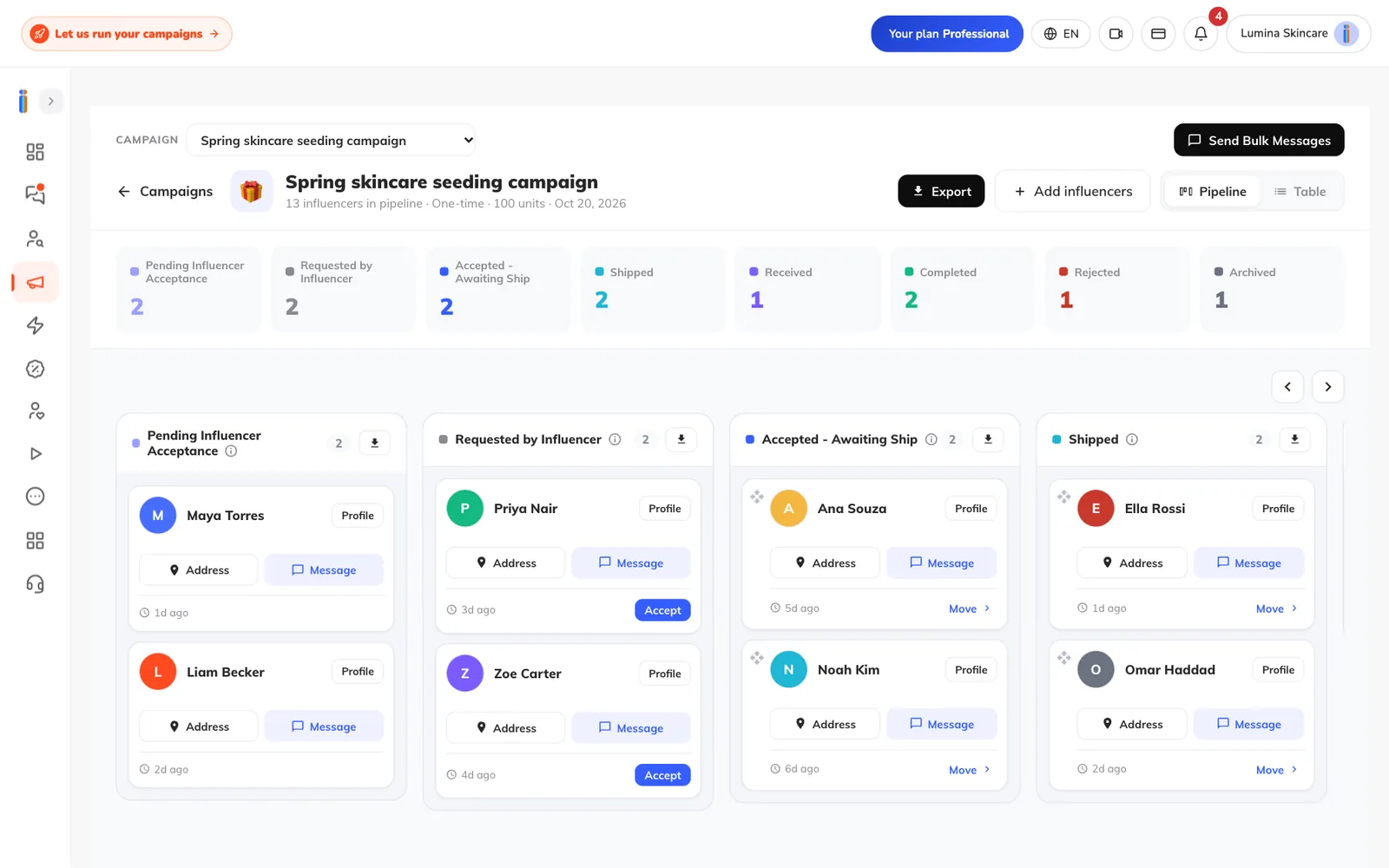
Drag a card to move it, or use its Move button. Switch to the table view when you prefer a list, and export a CSV by date range.
- Pending Influencer AcceptanceYou invited them and they have not answered
- Requested by InfluencerThey asked for the gift
- Accepted - Awaiting ShipYou said yes. Their address is now visible to you
- ShippedYou sent it. The address is frozen as the record
- ReceivedThey confirmed the parcel arrived
- CompletedThey told you they posted
- RejectedDeclined by you or by them
- ArchivedClosed out and kept for your records
Shipping
You ship it. We keep the record.
There is no shipping label or carrier integration for gifts. You send the parcel, and the app keeps the delivery record.
- Accepting a request shows you the creator's address; in chat a Copy address button copies it for your label
- Marking a card Shipped freezes the address on the deal as the delivery record
- Share the tracking number with the creator in the Ainfluencer chat
- A wrong address after shipping is fixed in chat with the creator
Shopify fulfilment and automatic tracking are available for paid collaborations. See product fulfilment.
What it costs
Launching is free. Taking creators in needs a plan
Every plan can build and launch a gifting program. Each creator you invite, and each request you accept, uses one of your plan's monthly spots, so the Free plan has to upgrade before it can invite or accept anyone.
| Free | Starter | Pro | Ultimate | |
|---|---|---|---|---|
| Price a month, billed monthly | $0 | $149 | $399 | $999 |
| Campaigns at once | 1 | 1 | 3 | Unlimited |
| Launch a gifting program | Yes | Yes | Yes | Yes |
| Creators you can take in each month | 0 | 25 | 250 | Unlimited |
Prices are for monthly billing. Quarterly and yearly billing cost less per month. See the pricing page for the current plans. A creator asking for your gift does not use a spot until you accept. The count restarts every month.
FAQ
Questions brands ask
Does a gifting program need approval?
No. Since October 2026 a program goes live as soon as you click Launch program. There is no review step and no approval email.
Can I launch a gifting program on the Free plan?
Yes, every plan can launch one. A program uses one of your campaign slots, and the Free plan has one. Taking creators in is different: each invitation and each accepted request uses a monthly spot, and the Free plan has none, so you need to upgrade before you can invite or accept anyone.
Who pays for shipping?
You do. "Brand covers all shipping costs" is a required setting for a seeding program, so creators never pay to receive a gift. You ship the product yourself and move the card to Shipped.
Do you ship the products for me?
No. There is no shipping label or tracking integration for gifting. You ship the product yourself, share the tracking number with the creator in the chat and move the card to Shipped. When a creator sends an address in the chat, a Copy address button copies it for your label. Shopify fulfilment and tracking exist for paid collaborations only.
Does the creator have to post?
That is up to the terms you set and the creator you pick. You can require disclosure, tags and hashtags, and the creator tells you in the app when they have posted and links the post. The pipeline then shows who received the product and who reported a post.
What if a creator never posts?
No money moves in a gifting program, so there is no escrow and nothing to refund. The pipeline and the chat record who received what. Product insurance belongs to paid collaborations that ship a physical product, not to gifts.
Can I pause a program?
There is no pause switch for brands today. Set an end date in Edit, or ask us to pause it. Parcels you have already agreed keep moving.
What is the difference between gifting and seeding?
The tools are the same. A targeted send to a handful of creators is gifting. A repeating drop to dozens is seeding. Read about product seeding.
Send your first gift this week.
Build a program, launch it and let creators come to you. You only pay for the product and the postage.
Screens show sample data from the app design.