




- English
- EspañolSpanish
- Português (Brasil)Brazilian Portuguese
- FrançaisFrench
- DeutschGerman
- ItalianoItalian
- NederlandsDutch
- TürkçeTurkish
- РусскийRussian
- УкраїнськаUkrainian
- PolskiPolish
- ČeštinaCzech
- SlovenčinaSlovak
- MagyarHungarian
- RomânăRomanian
- БългарскиBulgarian
- HrvatskiCroatian
- SrpskiSerbian (Latin script)
- LietuviųLithuanian
- ΕλληνικάGreek
- SvenskaSwedish
- DanskDanish
- NorskNorwegian (Bokmål)
- SuomiFinnish
- CatalàCatalan
- العربيةArabic
- فارسیPersian
- اردوUrdu
- עבריתHebrew
- हिन्दीHindi
- বাংলাBengali
- Bahasa IndonesiaIndonesian
- Bahasa MelayuMalay
- FilipinoFilipino (Tagalog)
- Tiếng ViệtVietnamese
- ไทยThai
- 日本語Japanese
- 한국어Korean
- 简体中文Simplified Chinese
- 繁體中文Traditional Chinese (Taiwan)
- KiswahiliSwahili
Product seeding for brands
Seeding at volume, without the spreadsheet
Run a repeating product program across many creators. Set the terms once, let creators come to you and follow every parcel and every post on one board.
- Monthly cadence built in
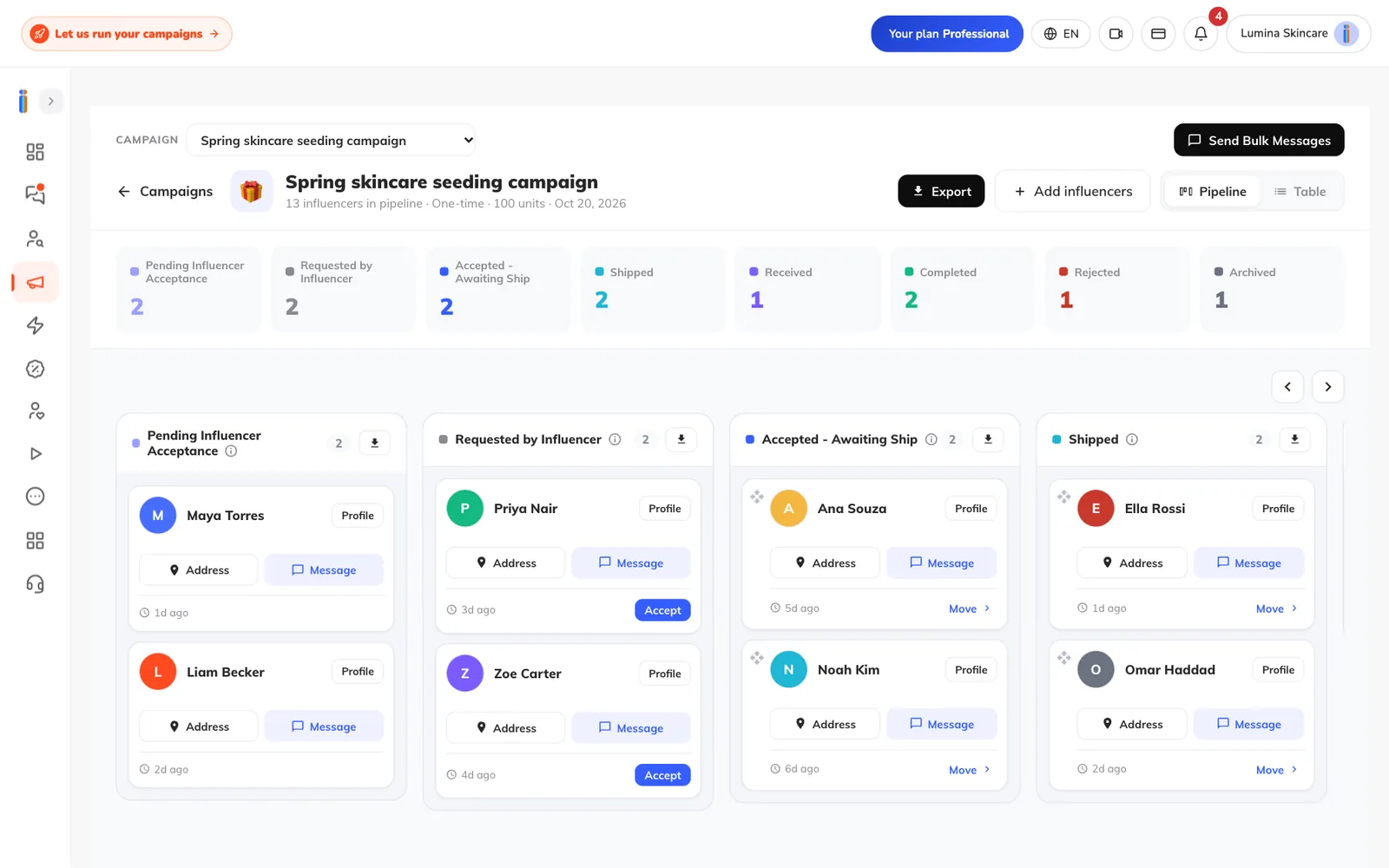
- 8 pipeline columns
- CSV export of the whole board

What seeding is
Gifting, run as a program
You send product to many creators on a repeating cadence and let the volume work. Nothing is paid to the creators, so your floor is unit cost plus shipping.
Built to repeat
Choose one-time or monthly, set units, a start date and an optional end date. Leave the end date empty to run until you stop it.
Matched where you ship
Pick the countries you ship from and to. Only creators in those countries are matched to your program.
One board for every parcel
A column for each stage, a table view, drag and drop, and a CSV export, so a program of two hundred stays manageable.
The wizard
Set the terms once, apply them to everyone
Six steps, saved as a draft each time. Products can come from your Shopify store or Amazon account, or be added by hand.
- Service: self-serve, or managed by our team after a brief call
- Cadence: one-time or monthly, units, start date and optional end date
- Recipients: categories, platforms, languages, audience size and one product per creator per quarter
- Requirements: minimum engagement rate, 18 and over, disclosure, tags, competitor exclusivity and your own terms
- Shipping: ship from and to, and you cover all shipping costs

The board
A board for hundreds of parcels
Every creator sits in a column. Accept a request, move the card forward, archive what is done and export the rest.
- Pending Influencer AcceptanceYou invited them and they have not answered
- Requested by InfluencerThey asked for the gift
- Accepted - Awaiting ShipYou said yes. Their address is now visible to you
- ShippedYou sent it. The address is frozen as the record
- ReceivedThey confirmed the parcel arrived
- CompletedThey told you they posted
- RejectedDeclined by you or by them
- ArchivedClosed out and kept for your records
Accepting a request or sending an invitation uses one of your plan's monthly spots.

Outreach that scales
Invite from search, message in one place
Creators can request your program themselves. You can also invite the ones you like.
Invite from search
Pick a seeding campaign, select creators and send the invitation. A saved list can be invited in one go.
Message in the Ainfluencer chat
Saved templates such as Warm and friendly or Short and sweet, linked to your program.
Bulk messages
Send Bulk Messages opens with the campaign already selected, to message everyone in it.

Shipping
You ship, in batches if you like
There is no shipping label or carrier integration for seeding. Export the board to work through your parcels.
- Accepting reveals each creator's address
- Moving a card to Shipped freezes that address as the record
- Share tracking numbers with creators in the chat
- Creators confirm receipt and tell you when they have posted
Shopify fulfilment and automatic tracking exist for paid collaborations. See product fulfilment.
Which plan for which volume
Your monthly spots decide how big a program can get
Every plan can launch a seeding program. Each invitation you send and each request you accept uses one spot, so the number of spots, not the unit count, sets your volume.
| Free | Starter | Pro | Ultimate | |
|---|---|---|---|---|
| Price a month, billed monthly | $0 | $149 | $399 | $999 |
| Campaigns at once | 1 | 1 | 3 | Unlimited |
| Launch a gifting program | Yes | Yes | Yes | Yes |
| Creators you can take in each month | 0 | 25 | 250 | Unlimited |
Prices are for monthly billing. Quarterly and yearly billing cost less per month. See the pricing page for the current plans. A creator asking for your gift does not use a spot until you accept. The count restarts every month.
FAQ
Questions brands ask
Does a seeding program need approval?
No. Since October 2026 a program goes live as soon as you click Launch program.
What is the difference between seeding and gifting?
Volume and repetition. A targeted send to a few creators is gifting. A repeating drop to dozens is seeding. The tools and the pipeline are the same. Read about product gifting.
Are the unit numbers a hard cap?
No. Units per month and total units are shown on the campaign as spots left, but they do not stop requests. What limits you is your plan's monthly spots: every invitation you send and every request you accept uses one.
What does the Free plan include?
You can build and launch one program. Taking creators in needs a plan, because the Free plan has no monthly spots.
What is the Managed option?
In the Service step you choose Self-serve, where you approve creators and ship yourself, or Managed, where our team runs it for you after a brief call. Managed is handled by hand by our team.
Who pays for shipping?
You do. "Brand covers all shipping costs" is a required setting for a seeding program, so creators never pay to receive a gift. You ship the product yourself and move the card to Shipped.
Can I export the board?
Yes. Export a CSV for the last 7, 30 or 90 days, all time or a custom range, either for the whole board or for a single stage. Open requests and pending invitations cannot be exported.
Can I message everyone in a program?
Yes. Send Bulk Messages opens the message window with the campaign already selected, and saved outreach templates such as Warm and friendly or Short and sweet go through the Ainfluencer chat.
Put your product in front of the right creators.
Set the terms once, launch, and run a seeding program without a spreadsheet.
Screens show sample data from the app design.