
NewContracts inside Ainfluencer Coming soon
Influencer contracts, signed inside Ainfluencer
Upload your agreement once, mark where each side signs, and send it to any influencer from the chat. She taps Next, signs in about a minute, and your deal starts.


How it works
Upload it, place the fields, send it
Four steps, and the first three happen once. After that, sending a contract is a tap in the chat.
- 1
Upload
A PDF or Word file, or a Google Docs link. We look for the signature lines.
- 2
Place fields
Mark who signs where. Names, fee and dates fill in from Ainfluencer.
- 3
Review and save
Pick who signs for your brand and when we ask the influencer to sign.
- 4
Send and sign
Send it from the chat. She taps Next from field to field and finishes.
1Upload
Start from the file you already use
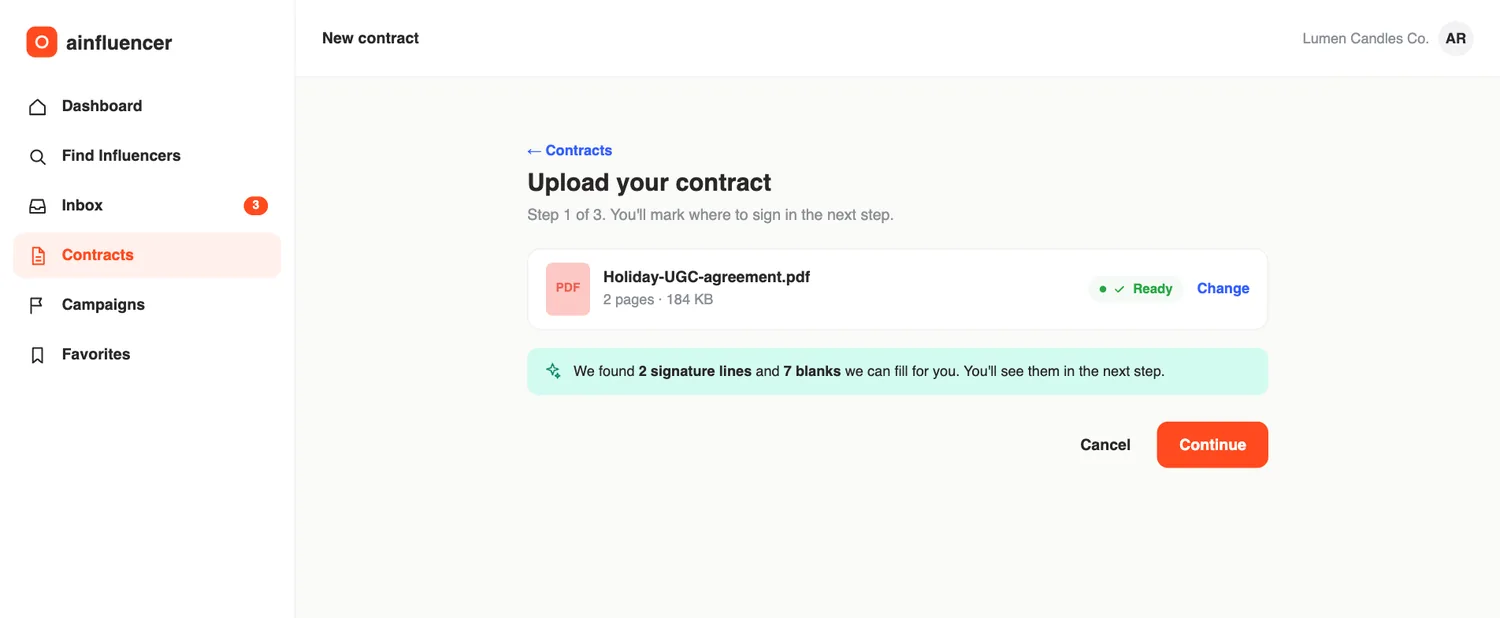
Bring your own agreement or start from one we saved for you. We read it and look for the signature lines, so most of the work is already done.
- A PDF or Word file, up to 10 MB and 30 pages
- Or paste a Google Docs link, or pick a document from Google Drive. We only read the one you pick
- Or start from a saved contract, like the built-in Ainfluencer standard agreement
- We tell you how many signature lines and blanks we found
Screens show sample data from the product design.
2Place fields
Mark where each side signs. We fill in the rest.
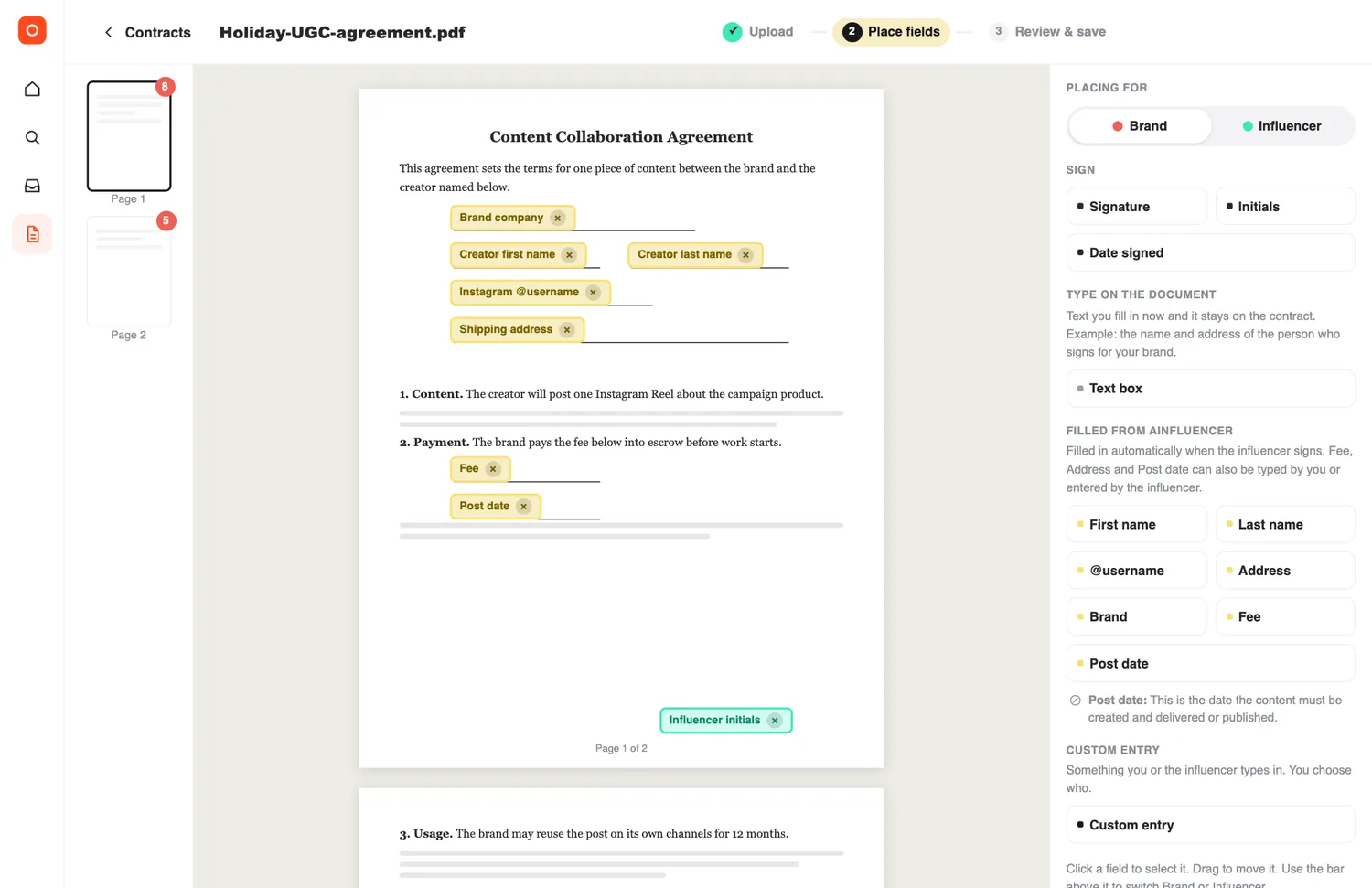
Two colours keep it clear: coral for your brand, mint for the influencer. Details that come from Ainfluencer are filled in automatically when she signs.
- Sign fields: signature, initials and date, each belonging to the brand or the influencer
- Type on the document: text that never changes, such as who signs for your brand and their address
- Filled from Ainfluencer: first name, last name, @username, shipping address, brand company, fee and post date
- Place automatically puts fields on the signature lines we found, or place them by hand
3Review and save
Decide who signs, and when she is asked
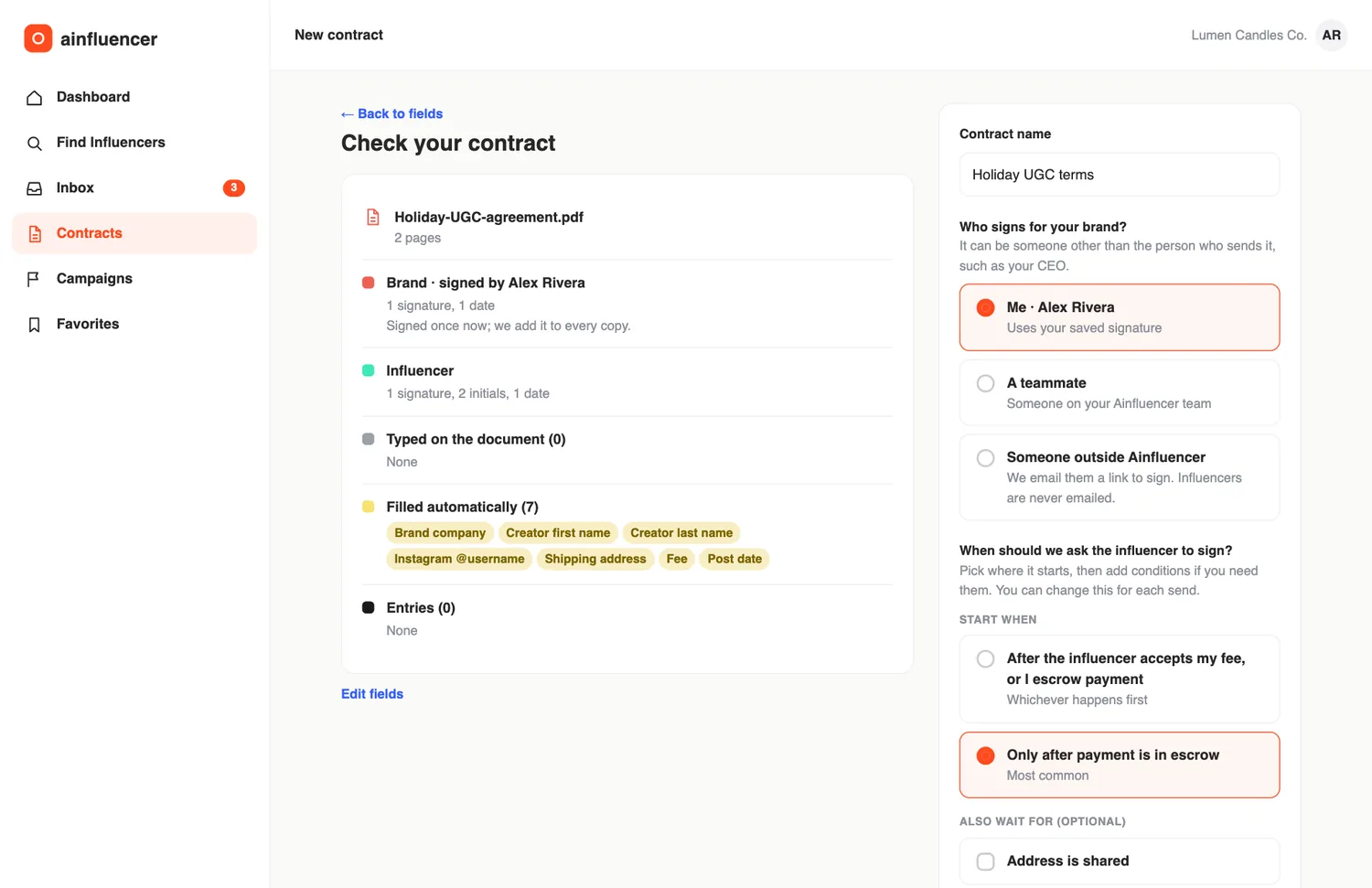
One decision per contract. The person who sends does not have to be the one who signs, such as your CEO.
- Who signs for your brand: you with your saved signature, a teammate, or someone outside Ainfluencer who gets an email link
- Ask her to sign only after payment is in escrow, or after she accepts your fee or you escrow payment, whichever comes first
- Optionally also wait for her address to be shared or the product to arrive
- Or send it yourself, for gifting and affiliates. Nothing is sent automatically, and you can always press Send now
4Brand signer
Your CEO signs once. Every copy carries it.
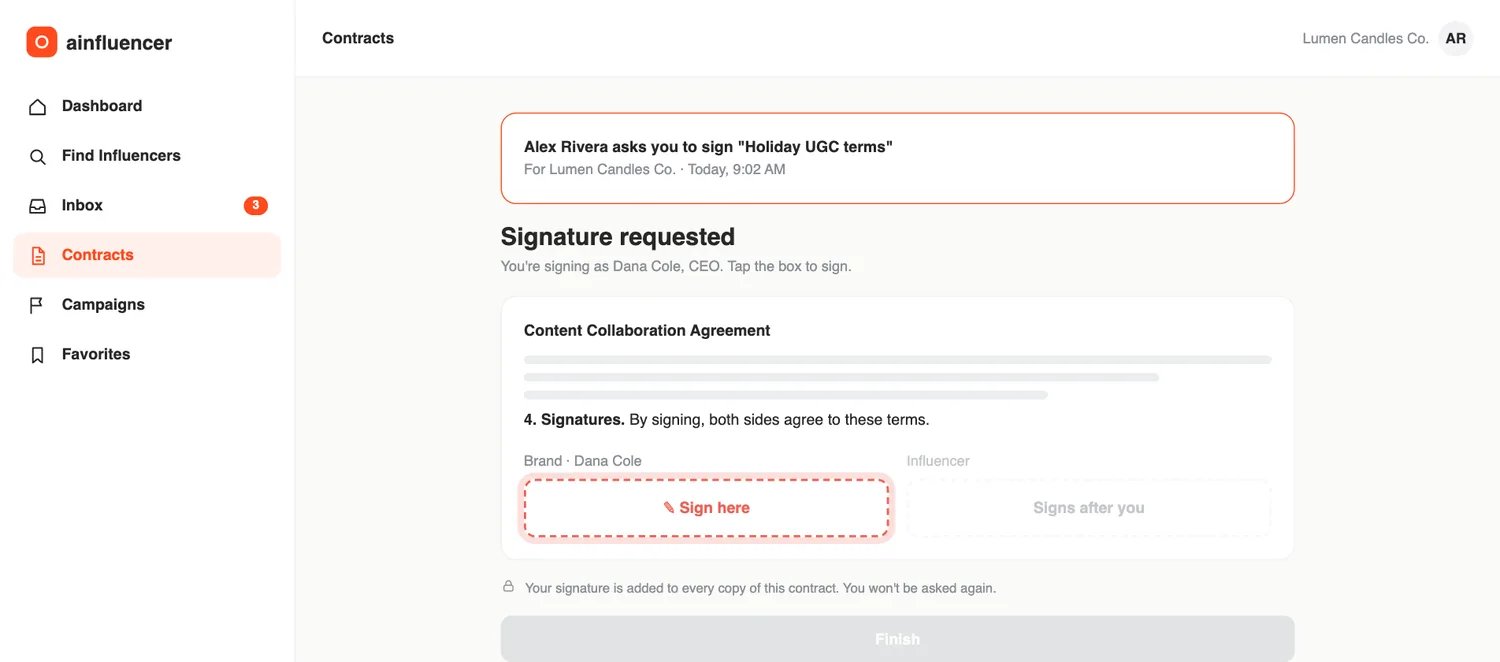
Ask the person who signs for your brand to add a signature one time. We add it to every copy of the contract, so you are not chasing them for each influencer.
- They get a clear request: who asked, which contract and for which company
- A signature added once is added to every copy, or they can sign each contract before it goes to the influencer
- The sender is told as soon as the signature is in, and can send to influencers
5Influencer signs
She signs in about a minute, on her phone
The contract arrives as a card in the chat. No email, no link, no account to create. She checks her details and follows Next from field to field.
- Her details are filled in from her profile, and she can edit any of them
- Next jumps to the next thing she needs to do
- She types or draws her signature once, and adopts her initials once
- She gets a receipt with the contract ID, the brand is told, and her copy is in the chat
- Her payment is held safely by Ainfluencer until the brand approves her content
Shown with sample data. The recording is the product design, not a live contract.
6Track
Every contract in one place
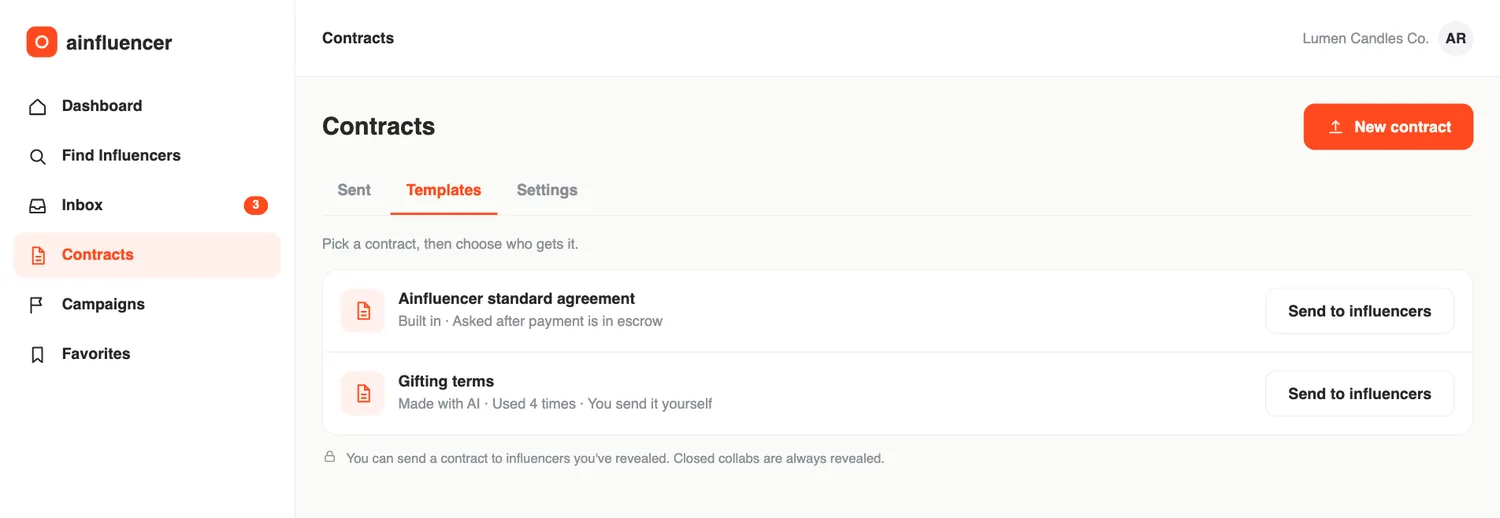
Contracts has a tab for what you sent, one for saved contracts and one for settings, so you always know who has signed and who has not.
- Filter by All, Waiting for both, Waiting for brand, Waiting for creator, or Signed
- Get a notification in Ainfluencer when a contract is signed
- Send reminders to people who have not signed: after a day, 2 days, 3 days or a week, up to 5 times
- Influencers are reminded in the chat. A signer outside Ainfluencer is reminded by email
Built for real files and real people
A deal should never stall on a form
The awkward cases are handled in the product, so you are not the support desk.
Scanned PDF?
Fields still work. Place them by hand when we cannot find the signature lines.
File too big or locked?
A plain message tells you the fix: use a file under 10 MB, remove the password, or save the Word file as a PDF.
Edited after sending?
It saves as a new version. Contracts already sent keep theirs, and show Replaced only when you send the new one.
She leaves halfway?
Her progress is kept. She resumes at the first field she has not done, and nothing is signed until she taps Finish.
Her details are wrong?
She edits them before she signs. The contract keeps what she typed, and we keep the original in the audit trail.
Initials on every page?
Each initials box is its own Next stop. She adopts her initials once and taps to apply them.
For brands
Send it in minutes, not days
Upload once and reuse the contract for every influencer. Your signature, your fee and her details fill in themselves. You see who has signed, and reminders do the chasing.
For creators
Sign on your phone in about a minute
The contract is a card in your chat. Your details are already in it, you tap Next, and your payment stays safely with Ainfluencer until the brand approves your content. Creator app
Powered by signID
Built on signID, with one change
signID is the prepare and sign experience from the brandID family, the sister product of Ainfluencer. We kept its layout and removed the Signers step, because every contract in Ainfluencer has exactly two people: your brand and the influencer.
FAQ
Questions brands ask
Still unsure about something? Ask in the chat once you have an account.
What can I upload?
A PDF or a Word file up to 10 MB and 30 pages. You can also paste a Google Docs link (set to Anyone with the link can view), pick a document from Google Drive, or start from a saved contract. We read the file and look for signature lines.
Who signs for my brand?
You, a teammate on your Ainfluencer team, or someone outside Ainfluencer who gets an email link. They can sign once and have that signature added to every copy, or sign each contract before it goes to the influencer. The person who sends does not have to be the one who signs.
When is the influencer asked to sign?
You choose when you save the contract: after she accepts your fee or you escrow payment (whichever happens first), only after payment is in escrow, or only when you send it yourself, which suits gifting and affiliates. You can add waits for her address or the product arriving, and you can always press Send now.
Do influencers get an email?
No. The contract arrives as a card in the Ainfluencer chat. She taps it, checks her details and signs. Influencers are never emailed.
What if her details are wrong?
Her name, @username and shipping address are filled in from her profile and she can fix any of them before she signs. The contract keeps what she typed, and the original profile value is kept in the audit trail.
Can I change a contract after I have sent it?
Yes. An edit saves as a new version. Contracts already sent keep their version, and they show as Replaced only when you send the new one.
Which influencers can I send a contract to?
Influencers you have revealed. Closed collaborations are always revealed. Saved contracts count toward your plan, and sending a contract that is already saved is never blocked. See the plans.
Is this legal advice?
No. Ainfluencer and signID give you the tool to prepare, send and sign. For advice about the terms of your agreement, ask a lawyer.
Be ready when contracts arrive.
Contracts are coming to Ainfluencer soon. Open your account now, reveal your influencers and get your agreement ready.
Screens and recordings on this page show sample data from the product design. Ainfluencer and signID provide the tool, not legal advice.
