contactID Review: Features, Pricing and Where It Falls Short
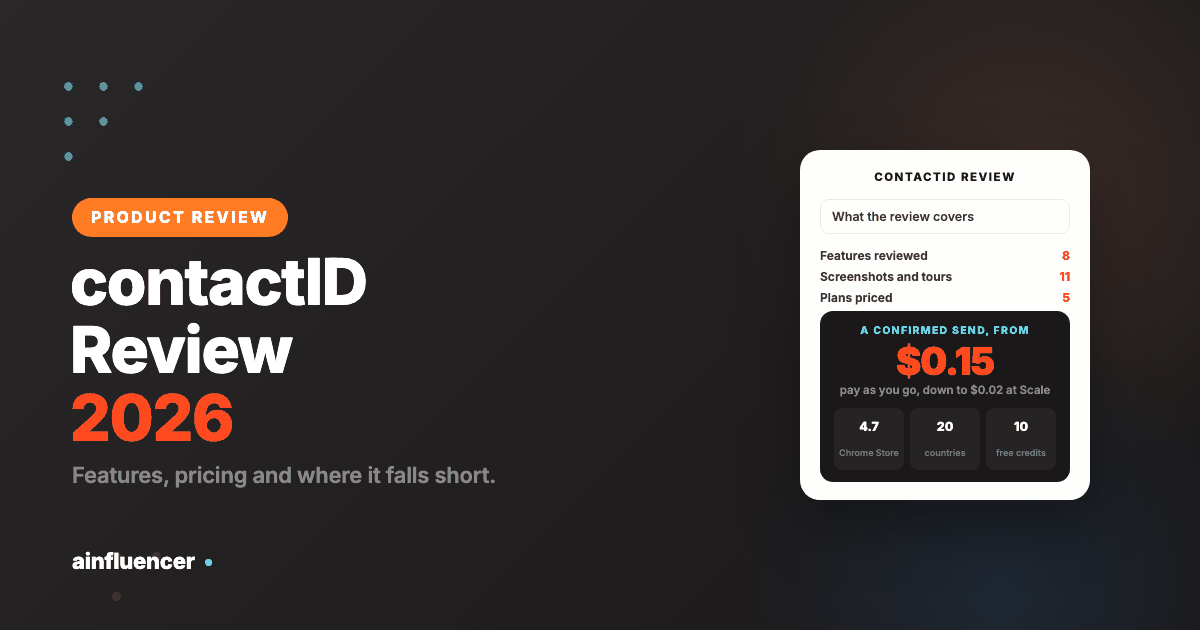
A hands-on look at contactID, the Chrome extension that sends your pitch through each business’s contact form: how it works, what each credit buys, what it costs from $0.15 down to $0.02 a confirmed send, and the limits we would want to know first.
contactID sends your message through the contact form on each company’s own website, from your own browser, and charges only when the site confirms the send. It also builds the list of businesses, writes a line for each site, splits a list across two messages and records every value it typed. This is a review of the product, and you should know who wrote it: we make contactID. So we kept to what can be checked. Every fact comes from the app’s own page, its live plans feed and its Chrome Web Store listing, read on 11 November 2026. The screenshots are ours, the animated tours were recorded from the dashboard in October 2026, and we quote no third-party review scores and give no star rating. The sections on pricing and on where it falls short are written to help you decide against it as much as for it.
contactID in Brief
| Question | Answer |
|---|---|
| What it is | A Chrome extension and web dashboard that sends outreach through the contact form on each website |
| Works in | Chrome, Edge and Brave on a computer. Firefox and Safari are not supported |
| Free to try | 10 free website credits, once, with no card. Sign in with Google or a 6 digit email code |
| Pricing | A credit per confirmed send: $0.15 pay as you go, plans from $29.99 a month, $0.02 a credit at the top plan |
| Best for | Sellers to local and small businesses, agencies and B2B teams who want to choose the list and see proof of each send |
| Not for | Anyone who needs named decision makers, reply tracking inside the tool, or a bulk blast of a million forms |
| Chrome Web Store | 4.7 out of 5 from 26 ratings and 540 users, version 4.0.6, updated 6 November 2026 |
What contactID Is, and Why Contact Forms
Cold email now takes real setup: sending domains, mailbox warm-up and a watch on your spam rate. Google tells bulk senders to keep the spam rate reported in Postmaster Tools below 0.10% and treats anyone sending more than 5,000 messages a day to Gmail accounts as a bulk sender. A contact form skips that. The message goes into a form the business built to hear from customers and arrives in its own inbox, with no sending domain of yours in between.
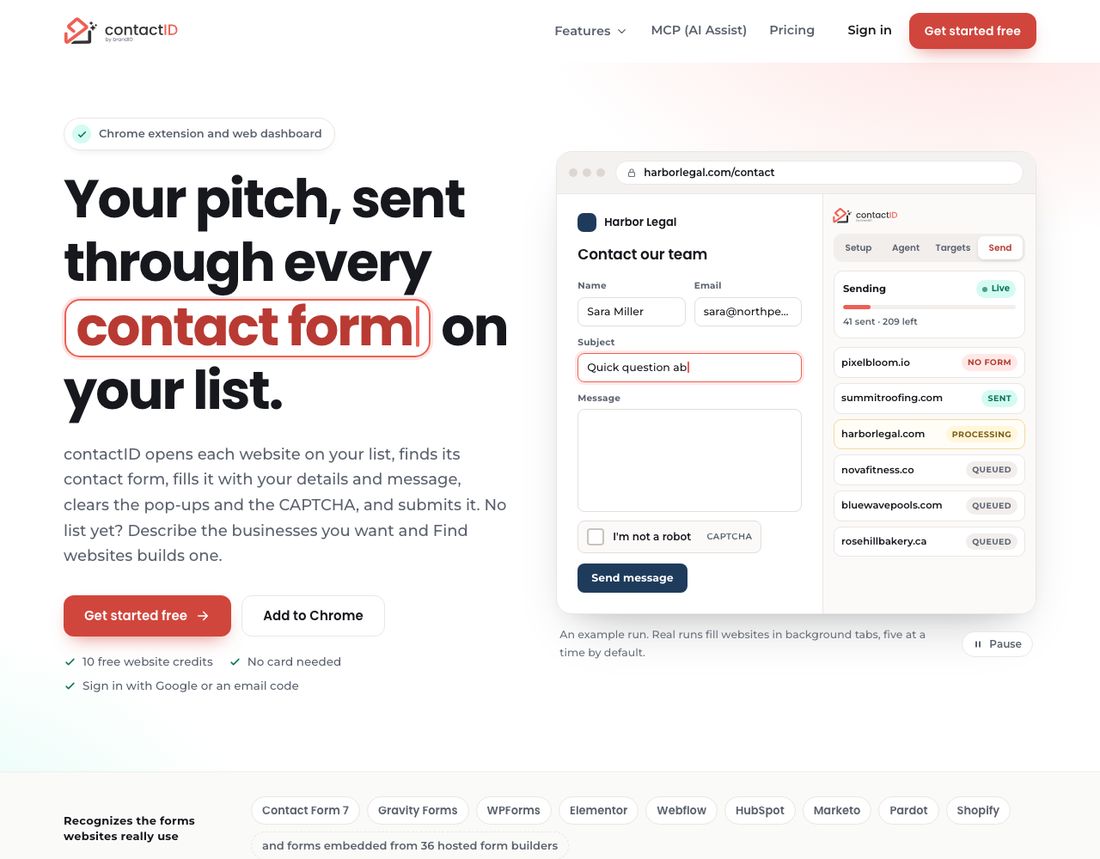
contactID automates that route. You give it a list of websites and a message, and it opens each site in a background tab of your own browser, finds the contact form, fills it, solves the CAPTCHA, submits once and reads the confirmation. The store listing names it as the renamed ContactUs AI, from the team behind brandID and Ainfluencer, and the privacy page says the service is operated by WATCHTHEMLIVE in Ontario, Canada. A walkthrough video and the feature overview are on our contactID contact form automation page.
Setup is three tabs in the extension, in order: the Agent (who you are and what you write), the Targets (the websites) and Send (press Start). A checklist ticks itself off as you go. For the wider channel, our guide to contact form marketing covers how it works and what to write.
contactID Review by Feature
Find Websites: Building the List
The feature we would test first, because most outreach fails on the list. Find websites searches Google Maps listings in 20 countries: Canada, the United States, the United Kingdom, Australia, Germany, France, Spain, Italy, the Netherlands, Ireland, New Zealand, Sweden, Belgium, Switzerland, Austria, Portugal, Poland, Mexico, Brazil and India. You can type a sentence such as dentists in Austin with 4 stars or more, or pick a category and a city, and it shows how many businesses match, how many are already yours and how many are new before you spend anything.
- Counting is free, and so is Search by AI (up to 10 searches a minute and 200 a day).
- Unlocking costs one lead credit per business delivered with a website. Businesses you already hold are skipped, so you never pay twice for one record.
- Lists go straight into your send queue, with tags such as the business name, the city and the rating available inside your message.
- Enrich my file: upload a CSV or Excel file of up to 5,000 websites or phone numbers and get their contact pages, at one lead credit per matched row.
- Lists that keep giving: download a list as a CSV, and find new places later without paying again for the ones you have.
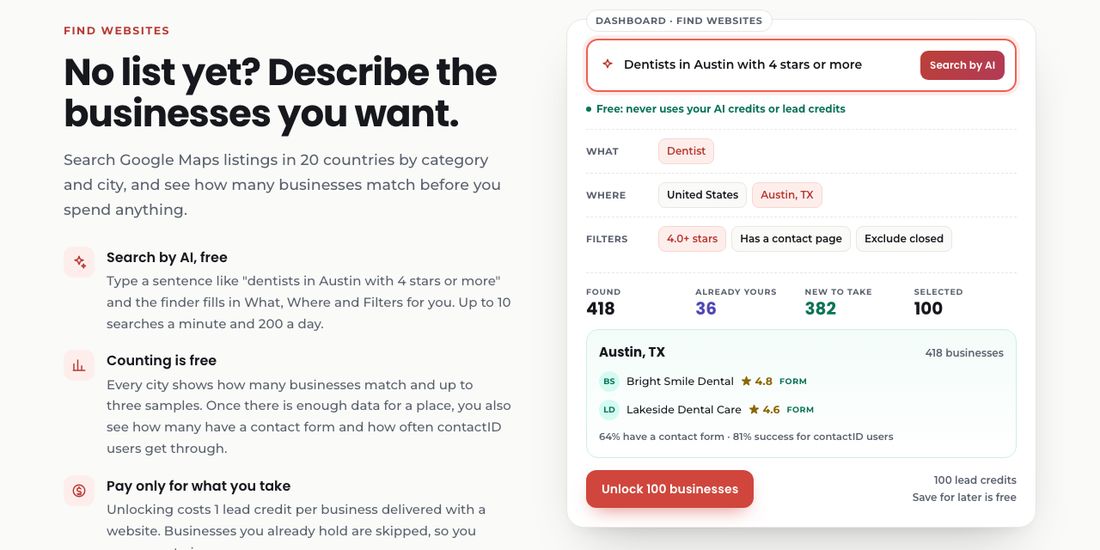
Our take. Seeing the count before you pay is the right order of operations, and a list built from public listings, with a contact page checked for each business, means fewer wasted credits. The limit is the data itself: it is business listings, so you get companies and their sites, not a named buyer.
The AI Sender: One Website From Open to Confirmation
The extension does the sending in background tabs of your own Chrome. For each website it opens the page, finds the contact form (including forms inside frames and a “Contact us” button that opens a pop-up), clears cookie banners, reads the form with AI, fills your agent’s details, solves the CAPTCHA, submits once and reads the confirmation. It recognises forms from 36 hosted builders and fills fields in more than 30 languages. By default it works five websites at a time, never more than one new form on the same website every 45 seconds, and you can set a daily limit and a send window in Settings.
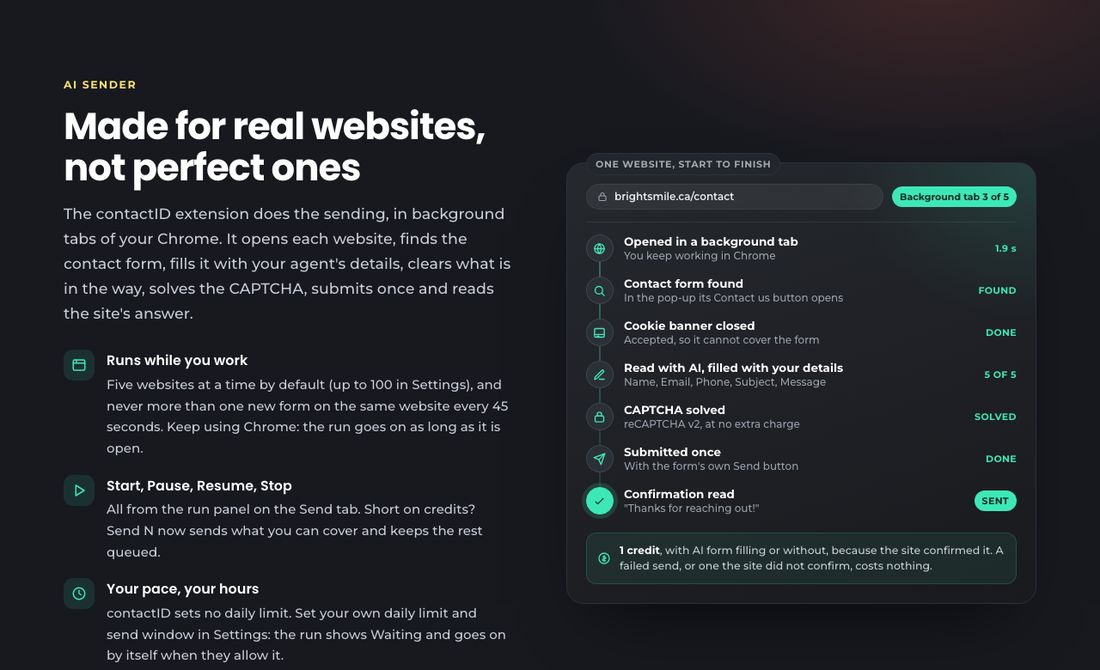
- CAPTCHAs are included: reCAPTCHA v2, v3 and Enterprise, hCaptcha, Cloudflare Turnstile, FunCaptcha and image CAPTCHAs, at no extra charge. You can add your own 2Captcha or Anti-Captcha key.
- A status for every site: Queued, Processing, Sent, Failed or No form, with the reason.
- Start, pause, resume, stop. Your queue is saved, so you can press Start again after closing Chrome.
- Websites you reached before are flagged when you import a list, so you can skip them.
Our take. The design choice that matters is reading the confirmation. A site is marked Sent only when it answered, and a send the site did not confirm costs nothing. The honest limit: some sites put a full-page bot check in front of the form, such as a Just a moment screen. contactID does not bypass those. They end as Failed and cost nothing, so they are a missed site, not a charge.
AI Writer: A Line for Each Website
The AI writer can draft your whole message from a short brief, and it can write a short line for each website using a placeholder you place in the message. You can see a sample for one site before you send, check the draft for words that look like spam, and choose the model for each agent from OpenAI, Anthropic and Google. It is optional. Without it your message goes out exactly as you wrote it, with your tags filled in. It is paid separately from an AI wallet you top up from $5 to $500, at about $0.0003 per placeholder with the default model.
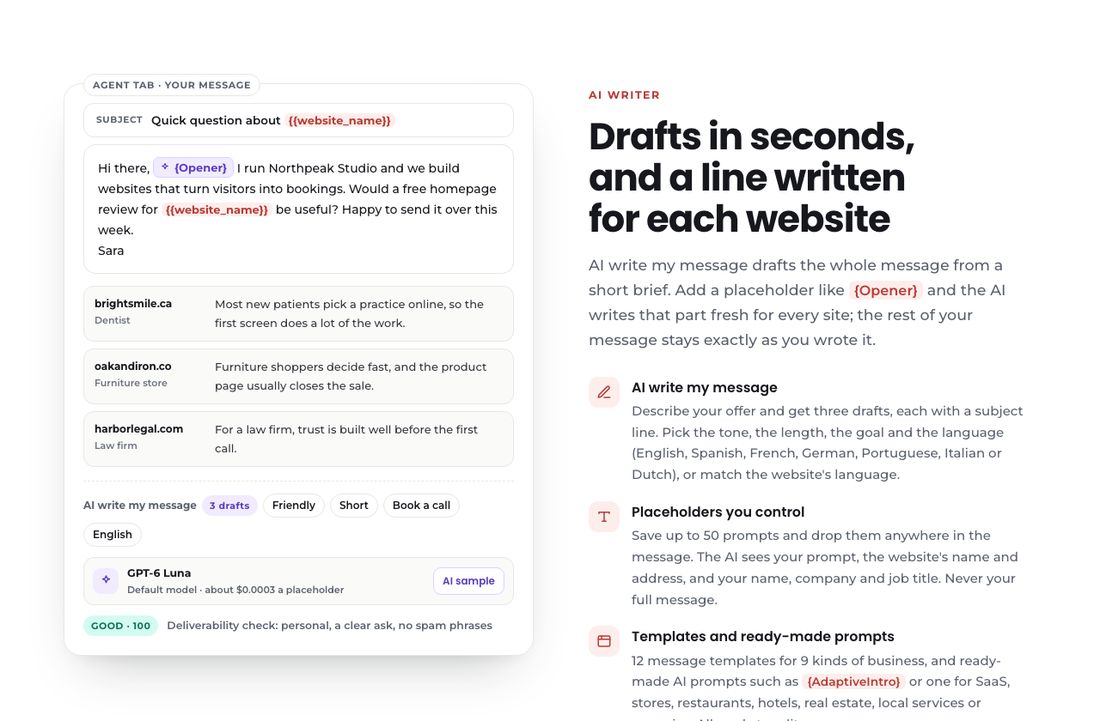
Our take. A line that mentions what the site actually shows is what makes a contact form message read as written for the reader. The AI providers get only your prompt, the website’s name and address, and your name, company and job title, never your full message, according to the privacy page.
A/B Split Testing
Pick two or more agents on the Targets tab, set each one’s share with a slider, or choose an even split, and contactID shares the queued websites out at random. The Send tab shows each agent’s success rate as it runs. Websites with no form never count against an agent, so the comparison is fair. The page advises giving each agent 50 or more sends before you trust the difference.
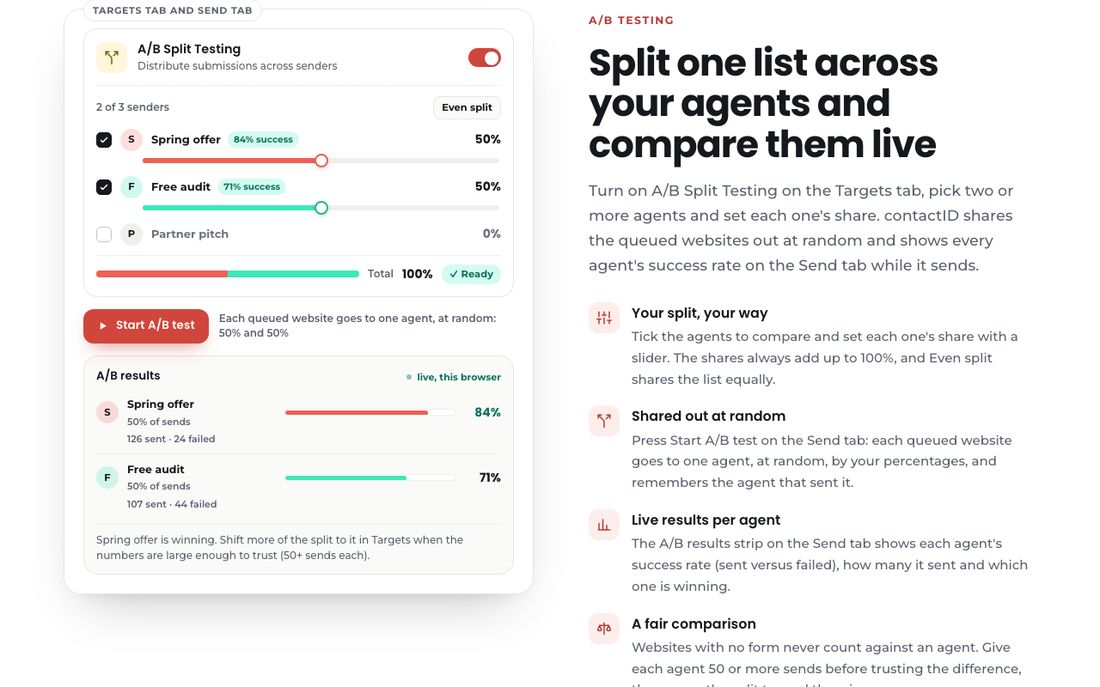
Our take. The test measures send success, not replies. contactID does not track replies yet, so to compare which message gets answered you search your inbox by subject line. That is a real gap.
Deep Analytics: Proof of Every Send
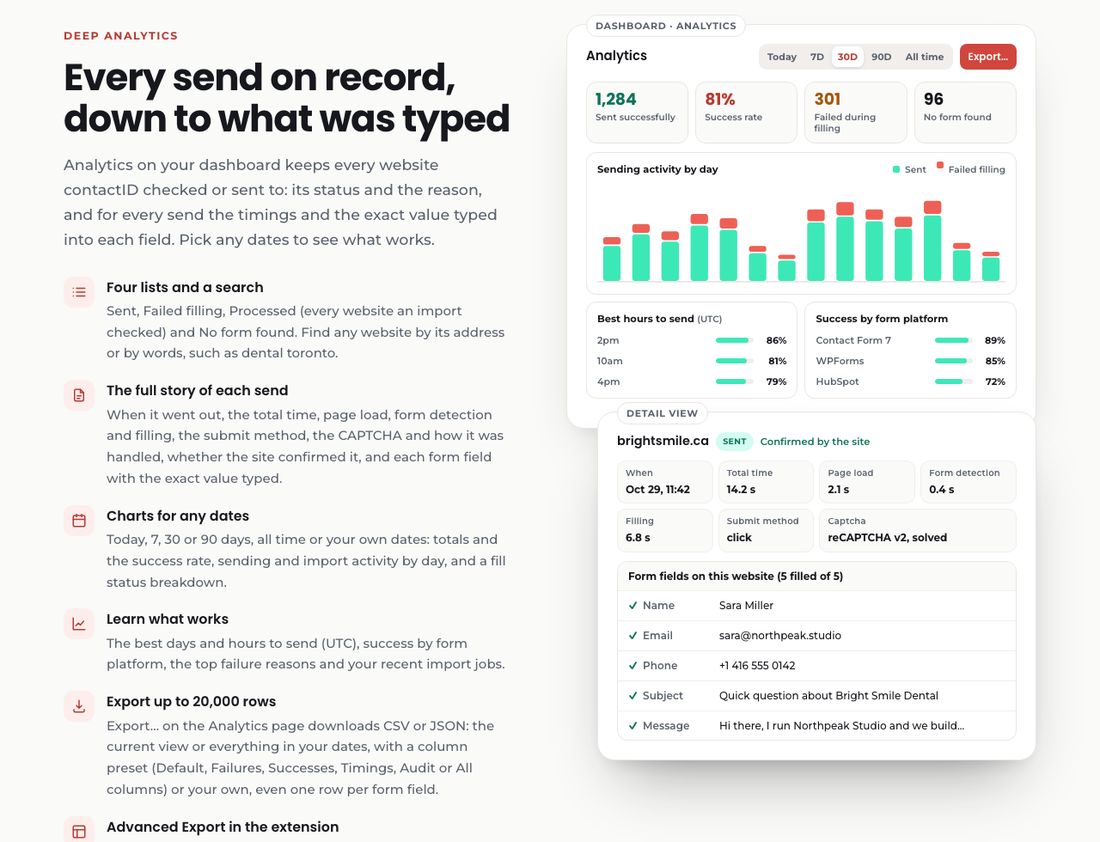
The analytics dashboard keeps every website’s status and the reason, and for each send the timings, the CAPTCHA and how it was handled, whether the site confirmed it, and the exact value typed into each field. It also shows success by form platform, the best hours to send in UTC and the top failure reasons. You can export up to 20,000 rows from the dashboard, and the extension can export a custom set of 24 columns as CSV, Excel, JSON and other formats. No screenshots are taken, so the field record is your audit trail.
Settings and Controls
The Settings tour shows the controls that decide how careful a run is: a daily limit and a send window, a do-not-contact list that accepts domains, URLs or email addresses, filters by country and page language, what to do when a form asks a question your agent cannot answer (skip the website, which is recommended, or answer neutrally), your own CAPTCHA key and rotating proxies, and how many websites are checked and forms filled at once.
AI Assist: Run It From Claude or ChatGPT
AI Assist connects Claude, ChatGPT, Cursor and other apps that support MCP, the open standard for connecting AI apps to tools, to your account. You add one address, https://contactid.brandid.app/mcp, sign in and choose what each app may do. Then you can ask in plain language: find dental clinics in Toronto, add the ones with a contact form to my send lists, send 200 today. The page says large runs wait for your approval, you can undo an app’s changes for 30 days and pause every app with one switch, and an app can never buy credits, change your plan or card, touch your password or change your email. AI Assist is free, and what the app does uses your usual credits.
contactID Pricing: Three Kinds of Credit
The pricing looks more complicated than it is. There are three separate things you can buy, and a new account gets 10 free website credits to try the first.
| Credit | What it pays for | How you buy it |
|---|---|---|
| Website credit | One send that the site confirms, with AI form filling included. Checking, no form, failed and unconfirmed sends are free | Pay as you go, or included in a plan |
| Lead credit | One business delivered with a website when you unlock a list in Find websites, or one matched row in Enrich my file | Packs of 100 for $5, 500 for $20, 2,000 for $60 or 10,000 for $250. Plans do not include lead credits |
| AI wallet | AI writing, paid per message and only when an agent uses AI | Top up from $5 to $500 |
Plan credits are used first. Unused plan credits move to your extra credits at renewal, and extra credits never expire. There are no daily limits unless you set one. You can cancel from Plan and Billing, and the plan runs to the end of the period you paid for.
The Plans
| Plan | Price | Website credits | Per credit | Extra credits | Websites per import |
|---|---|---|---|---|---|
| Pay as you go | No plan | As you buy | $0.15 | Credits never expire | Up to 50 |
| Starter | $29.99 a month, $290.99 a year | 200 a month | $0.15 | $0.20 | 500 |
| Growth | $99.99 a month, $799.99 a year | 833 a month | $0.12 | $0.15 | 1,000 |
| Pro | $149.99 a month, $1,200 a year | 3,333 a month | $0.05 | $0.06 | 2,500 |
| Scale | $399.99 a month, $2,999.99 a year | 19,999 a month | $0.02 | $0.03 | Unlimited |
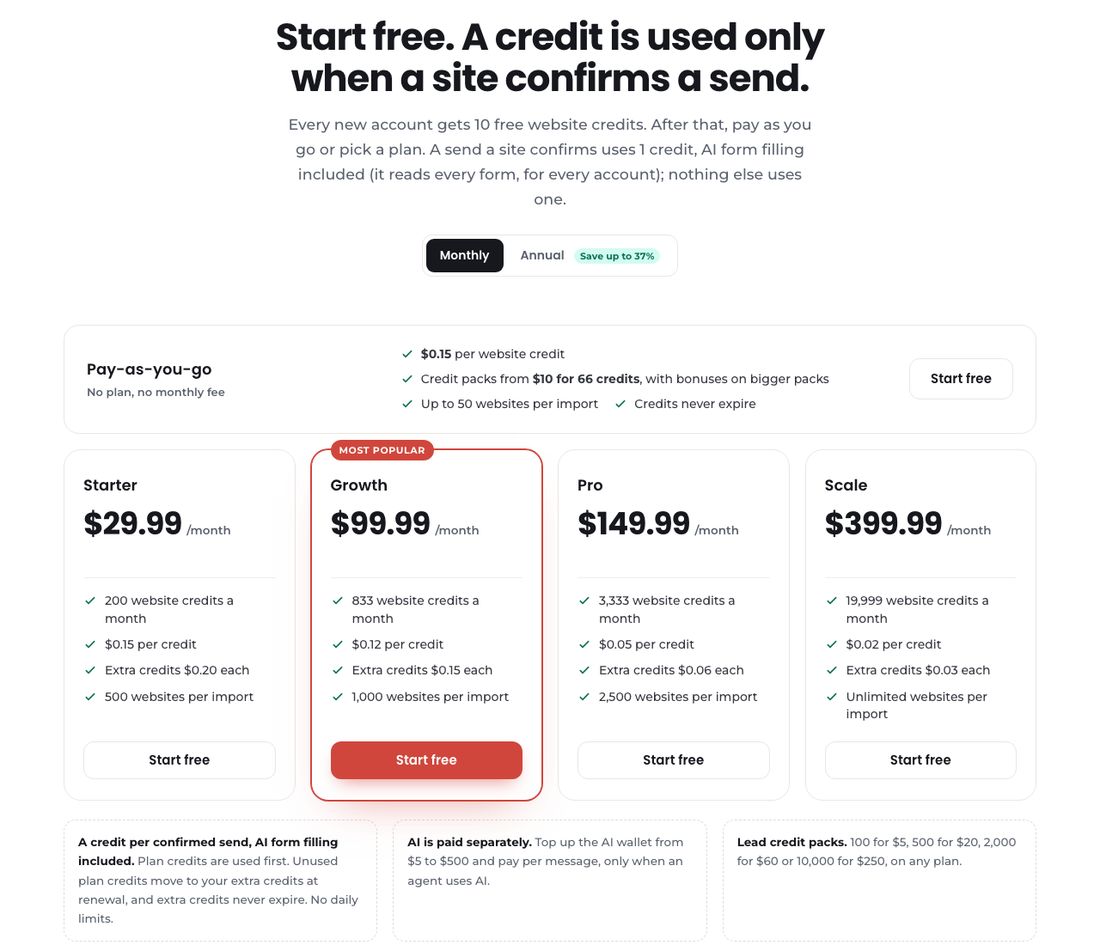
Annual billing saves up to 37%: Starter $290.99 a year, Growth $799.99, Pro $1,200 and Scale $2,999.99 on the live plans feed. Accounts that have never paid end their messages with a line, Sent via contactID extension. Any purchase removes it for good, whether a credit pack, a plan, AI credits or lead credits.
Which Plan Fits Your Volume
| Confirmed sends a month | Cheapest option | Bill | Per confirmed send | Who it fits |
|---|---|---|---|---|
| 200 | Starter | $29.99 | $0.150 | A small test or a solo seller |
| 1,000 | Growth | $125.04 | $0.125 | A month of steady outreach |
| 3,333 | Pro | $149.99 | $0.045 | One plan fully used |
| 10,000 | Scale | $399.99 | $0.040 | A busy agency |
| 19,999 | Scale | $399.99 | $0.020 | The top plan fully used |
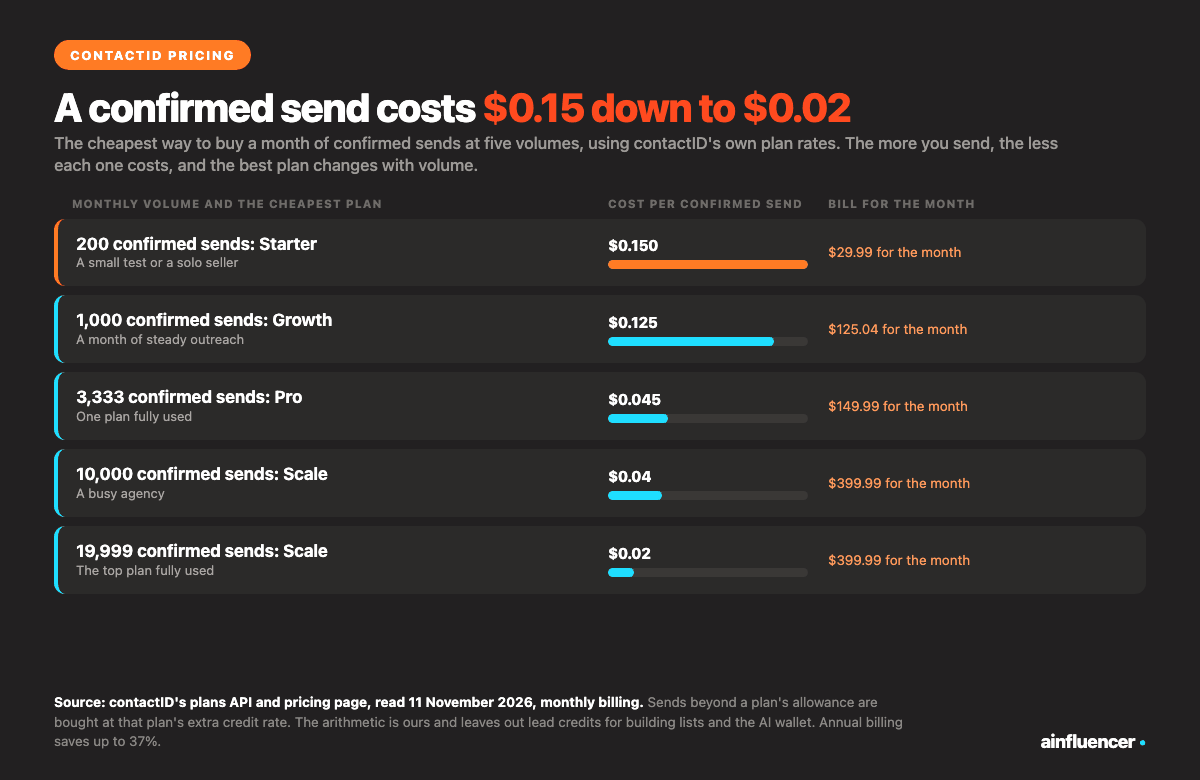
The pattern is the useful part. Starter only ties pay as you go at 200 sends, because its extra credits cost $0.20 against $0.15, so up to about 667 sends a month there is no reason to subscribe. Growth is cheapest from about 667 to about 1,167 sends, Pro from there to about 7,500, and Scale beyond that. This is our arithmetic from the plan rates and leaves out lead credits and the AI wallet, so a month that builds a new list costs more.
contactID Pros and Cons
You pay only for confirmed sends
A site that confirms uses a credit. A site with no form, a failed send or an unconfirmed send is free.
You choose and count the list
Find websites shows how many businesses match before you pay, and skips the ones you already hold.
Proof of what went out
Every site’s status and the exact value typed into every field is on record, with exports up to 20,000 rows.
Slower than a bulk blast
It sends five websites at a time from your own browser. It is built for care, not for a million forms.
Replies are not tracked
Replies go to the address in your agent. You read them in your inbox, and the A/B test measures send success only.
Costs more per send than bulk packages
A confirmed send is $0.15 down to $0.02. Bulk services charge a fraction of a cent per submission for a different product.
Where contactID Falls Short
We could not point to a source of negative reviews: it is a small product, and the Chrome Web Store shows a 4.7 average from 26 ratings, which is too few to read much into. So this table is built from the product’s own documented limits, which is where a buyer would be disappointed.
| Limit | What it means for you | What to do about it |
|---|---|---|
| It does not read or track replies | You cannot see which message got answered inside the tool | Use a distinct subject per agent and search your inbox. Reply tracking is the most requested addition |
| It runs in your browser | Sending stops when Chrome is closed. The queue is saved, and you press Start again | Use a computer that can stay on. Chrome, Edge and Brave are supported, Firefox and Safari are not |
| Full-page bot checks are not bypassed | Sites behind a Just a moment screen end as Failed. They cost nothing | Treat them as missed sites and keep a second route for those |
| Businesses, not people | Lists are business listings with websites. It does not give named decision makers or job titles | Use it with a named contact source if you need a person |
| Forms that ask a question it cannot answer | The default is to skip the website, so nothing is sent and no credit is used | Fill in the answer in your agent, or choose to answer neutrally in Settings |
| A signature on free accounts | Messages from accounts that have never paid end with Sent via contactID extension | Any purchase removes it, including a $5 lead credit pack |
| No daily limit by default | contactID sets none, so a long queue can send as fast as its pace allows | Set your own daily limit and a send window in Settings |
| AI is separate | AI writing is paid per message from its own wallet | It is optional. Without it your message is sent exactly as written |
Privacy and Data
The privacy section of the app page lists what the operator promises: it never sells your data and never uses it to train AI models, Google sign-in asks only for your basic profile, with no access to Gmail, Drive or Calendar, there are no advertising cookies, and no screenshots of the websites you contact are taken. Payments go through Stripe, so the service never sees your card number, and everything runs over HTTPS. Lead data comes from public business listings only. You can ask for your account to be deleted by email. These are the operator’s own statements, and we are the operator’s sibling brand, so read the privacy policy yourself.
Who Should Use contactID, and Who Should Not
Good fit
Agencies and freelancers selling web design, SEO, marketing or software to local and small businesses, who want to choose the list and see proof of each send.
Good as a second route
B2B teams whose email is not reaching some companies and who want a channel that does not depend on inbox placement.
Poor fit
Teams that need named decision makers, reply tracking in one tool, or a bulk blast. See the bulk services below.
If volume at the lowest price is your goal, read our review of CFLeads and its alternatives, which prices bulk contact form services per 1,000 submissions. For the rest of the field, see our guide to the best AI contact form automation tools, and for the email side, our comparison of cold email software.
A 10 Minute Test Before You Pay
Install and sign in
Add the extension to Chrome, Edge or Brave and sign in with Google or an email code. You get 10 free website credits with no card.
Set up your agent
Write who you are, your contact details and a short message of three to five sentences. Add one tag such as the business name.
Pick ten businesses
Use Find websites to count a category and city for free, or paste ten websites you already know.
Press Start and watch
Watch each site go from Queued to Sent, Failed or No form, and open the analytics to see the exact values typed.
Count replies in your inbox
After a few days, count the replies you can read. That is the number that tells you whether to buy.
What We Could Not Verify
- Reply rates. contactID does not track replies, and we ran no test campaign for this review, so we quote none.
- Any third-party review score. We did not collect or quote one.
- How the product behaves on every form. The product page says it recognises 36 hosted form builders and fills fields in more than 30 languages. These are the product’s own figures.
- The October tours may differ slightly from the current dashboard, and their billing screen is not used here because its prices do not match the live plans feed.
Conclusion: Is contactID Worth It?
contactID is worth testing if you want contact form outreach with a list you chose, a send you can confirm and a record you can audit, and you can live without reply tracking and named contacts. It is the wrong tool if you want a million submissions for a few dollars or a person’s name on every row. The free 10 credits cost nothing to try, which is the fairest way to judge a tool whose makers wrote the review. You can start from the contactID page.
Frequently Asked Questions
What is contactID?
contactID is a Chrome extension and web dashboard that sends your message through the contact form on each business’s own website, from your own browser, and reads the confirmation. It can also build the list from Google Maps listings, write a line for each site with AI and split test two messages.
Is contactID free?
Every new account gets 10 free website credits, once, with no card. After that you can pay as you go at $0.15 a credit or subscribe to a plan from $29.99 a month. Counting a list in Find websites is free.
How much does contactID cost?
A website credit is $0.15 pay as you go. Plans are Starter $29.99 a month for 200 credits, Growth $99.99 for 833, Pro $149.99 for 3,333 and Scale $399.99 for 19,999, which is $0.15, $0.12, $0.05 and $0.02 a credit. Annual billing saves up to 37%.
What uses a credit?
One website credit for each send the site confirms, with AI form filling included. Checking sites, sites with no form, failed sends and sends the site did not confirm are free.
Does contactID read or track replies?
No. Replies go to the email address in your agent, like any contact form message. contactID does not read or track them yet, so you compare replies in your inbox.
Does contactID work on Firefox or Safari?
No. It works in Google Chrome and other Chromium browsers such as Microsoft Edge and Brave on a computer.
Does contactID keep sending when Chrome is closed?
No. Sending runs in your browser. Your queue is saved, so you press Start again when you are back.
Does contactID solve CAPTCHAs?
Yes, at no extra charge: reCAPTCHA v2, v3 and Enterprise, hCaptcha, Cloudflare Turnstile, FunCaptcha and image CAPTCHAs. Full-page bot checks such as a Just a moment screen are not bypassed, and those sites end as Failed and cost nothing.
Can I use contactID with Claude or ChatGPT?
Yes. AI Assist connects Claude, ChatGPT, Cursor and other apps that support MCP to your account. It is free, and what the app does uses your usual credits. Large runs wait for your approval.
How does contactID compare with a bulk service such as CFLeads?
They are different products. A bulk service sells submissions by the package from its own database at a fraction of a cent each. contactID sends to a list you chose, one confirmed send at a time, at $0.15 down to $0.02, with a record of every field typed.
Is contact form outreach legal?
It depends on the country and the content. The FTC says CAN-SPAM makes no exception for business-to-business email, and Canada’s anti-spam law carries penalties up to $10 million for businesses. These rules are written for email and messages, so ask a lawyer how they apply to a form submission. This is not legal advice.
Key Takeaways
- contactID sends your message through each website’s own contact form from your browser and bills one credit only when the site confirms the send.
- A confirmed send costs $0.15 pay as you go and falls to $0.02 at the Scale plan. The cheapest option changes at about 667, 1,167 and 7,500 sends a month.
- Find websites builds a list from Google Maps in 20 countries and counts it for free, with lead credits sold separately from $5 for 100.
- It does not read or track replies, runs only while Chrome is open, and gives businesses, not named people.
- The 10 free credits are the fairest test. We make contactID, so we kept to documented facts and listed its limits.