How to Launch a Product on Amazon in 2026 (7-Step Playbook)
Jump To
An Amazon product launch is the single highest-leverage activity in your entire business. The first 30 days after your listing goes live sets the trajectory for the product’s entire lifetime. Sellers who nail Amazon product launch mechanics in month one see compounding organic sales for years; sellers who fumble it spend months trying to recover from a weak start.
This guide walks through the exact playbook top sellers use in 2026 for Amazon product launch, from pre-launch prep to day-30 organic rank conversion. For the broader context on Amazon selling, see our pillar guide on how to sell on Amazon.
The Amazon Honeymoon Period Explained
Amazon gives new products a temporary boost. Your job is to make it permanent.
Amazon’s algorithm gives new listings a temporary ranking boost during the first ~30 days. This “honeymoon period” isn’t officially documented, but data from thousands of tracked launches confirms it exists. During this window, Amazon rewards new products with disproportionate impressions to test market fit. Your Amazon product launch strategy centers on maximizing conversions and reviews during this window to lock in organic ranking before the boost fades.
Sellers who understand the honeymoon period treat launch as a 30-day sprint, not a slow ramp. Everything from PPC bids to external traffic timing gets front-loaded to capture Amazon’s attention while the boost is active. Mediocre execution during the honeymoon means fighting for organic rank forever; strong execution means compounding sales that need less and less PPC over time.
Pre-Launch Prep: The 4 Weeks Before Launch
A great Amazon product launch is 80% prep, 20% execution.
The four weeks before your inventory checks in are critical. Complete your Amazon product research and confirm unit economics support 25%+ net margin after all fees. Order high-quality product photography ($500 to $2,000, see our photography guide). If you’re brand-registered, design A+ Content modules (A+ Content guide).
4-Week Pre-Launch Timeline
- Four weeks out: Complete keyword research (Helium 10 Cerebro, Jungle Scout Keyword Scout)
- Three weeks out: Draft listing copy, hire product photographer
- Two weeks out: Enroll in Brand Registry and Amazon Vine
- One week out: Recruit 5 to 10 creators via Ainfluencer, prep PPC campaign structure
Step 1: Amazon Product Launch Keyword Strategy
Every keyword you rank for during launch compounds. Every keyword you miss disappears.
Identify Your 5 Priority Keywords
Use Helium 10 Cerebro or Jungle Scout Keyword Scout to reverse-engineer your top 3 competitors and pull every keyword they rank for. Filter for keywords with 3,000+ monthly searches and CPC under $2. Pick 5 “priority” keywords to seed your Amazon product launch PPC campaigns and preload into your listing title and bullets. Identify 20 to 30 “long-tail” keywords for backend fields, see our backend keywords guide and full Amazon SEO workflow.
Step 2: Optimize Your Listing Pre-Launch
Your listing converts (or doesn’t) traffic Amazon sends during the honeymoon window.
Front-Load Priority Keywords Everywhere
Your listing has 7 optimization surfaces: title, bullets, description, backend keywords, A+ Content, main image, gallery. Place your #1 priority keyword within the first 5 words of your title (see title optimization). Lead each bullet with a benefit + supporting keyword (see bullet points best practices). When Amazon serves your listing during the Amazon product launch window, every impression converts at maximum rate. See our comprehensive listing optimization guide.
Step 3: Run PPC Campaigns From Day One
The honeymoon boost only compounds if you seed sales velocity from hour one.
Launch Auto + Manual Campaigns Simultaneously
Run two Sponsored Products campaigns from day one: an auto campaign (budget $30 to $50/day, Amazon picks keywords, great for discovery) and a manual exact-match campaign (budget $30 to $50/day, targeting your 5 priority keywords). Expect 60%+ ACoS in week one, that’s normal during the launch phase. By week 4, ACoS should trend toward your target (usually 25 to 35%). See our what is Amazon PPC and PPC strategy for beginners guides.
Step 4: Drive Review Velocity Immediately
Amazon requires ~5 reviews before PPC meaningfully converts. Get there fast.
Enroll in Vine + Request a Review Aggressively
An effective launch prioritizes reviews from day one. Enroll every parent ASIN in Amazon Vine, $200 flat fee for up to 30 reviews (Brand Registry required). Use the “Request a Review” button in Seller Central after every order, adds 5 to 10% review conversion. Target 15 reviews within the first 21 days. See our how to get Amazon reviews guide.
Step 5: Drive External Traffic for Amazon Product Launch
External traffic is Amazon’s strongest ranking signal, and most sellers ignore it.
Partner With 5-10 Creators During Launch Week
External traffic, clicks from outside Amazon that convert on your listing, is the strongest signal you can send Amazon that your product deserves higher rank. Top sellers seed Amazon product launch with 5 to 10 creator partnerships during launch week. TikTok and Instagram creators drive impulse purchases; YouTube reviewers drive higher-intent traffic that converts at 3 to 5× rates. Platforms like Ainfluencer connect Amazon sellers with vetted creators, no upfront fees. See drive external traffic to Amazon.
Step 6: Monitor BSR Daily
Best Sellers Rank tells you whether your launch is compounding or stalling.
Track BSR Every 24 Hours
Monitor your product’s Best Sellers Rank (BSR) daily during launch. If BSR is dropping (better rank), your launch is working. If BSR is flat or climbing (worse rank), pause and diagnose before spending more on PPC. Common causes of stalled launches: weak main image, thin reviews, wrong keywords, or product-market mismatch. See our full guide on Amazon BSR for interpretation.
Step 7: Convert to Organic Ranking
The last 10 days of the honeymoon window are when you cement organic rank.
Reduce PPC, Watch Organic Sales
By day 20 to 25 of your Amazon product launch, you should see organic sales appearing (sales without PPC clicks attributed). This is the signal that Amazon’s algorithm has learned your listing converts and started serving it organically. In the final 10 days, gradually reduce PPC bids by 10 to 15% and watch if organic sales hold. If they do, your Amazon product launch has successfully converted to sustainable organic ranking.
Ready to Launch Your Amazon Product?
External creator traffic is the single fastest way to boost Amazon product launch velocity, generate reviews, and compound organic ranking. Ainfluencer connects Amazon sellers with vetted TikTok, Instagram, and YouTube creators, no upfront fees.
30-Day Amazon Product Launch Schedule
This is the exact day-by-day roadmap top sellers follow during their launch. Hitting these milestones on schedule is what converts the honeymoon boost into permanent organic ranking.
| Days | Focus | Actions | Success Signal |
|---|---|---|---|
| Day 1 | Launch Live | Enable PPC, Vine, request first creators | First PPC clicks |
| Days 2 to 7 | Velocity | 5 to 10 creator posts, PPC bid tuning | 3 to 5 organic orders/day |
| Days 8 to 14 | Review Ramp | Vine reviewers post, Request a Review | 5 to 10 reviews accumulated |
| Days 15 to 21 | Rank Climb | BSR dropping, add long-tail keywords | 15+ reviews, organic sales appear |
| Days 22 to 30 | Organic Conversion | Reduce PPC bids 10 to 15% | 30%+ sales are organic |
The Honeymoon Window: Why Timing Matters
Amazon Product Launch Timeline Summary
Here’s the compressed 30-day view. Day 1: launch live, PPC active, first Vine reviewers assigned. Days 2 to 7: 5 to 10 external creators posting, first organic reviews trickling in. Days 8 to 14: BSR steadily dropping, ACoS declining. Days 15 to 21: 15+ reviews accumulated, organic sales appearing. Days 22 to 30: reduce PPC gradually, lock in organic rank. By day 30, most successful launches show 30 to 50% organic sales share and stable BSR in category top 5,000.
Post-launch: Sustaining momentum after day 30
Once your launch converts into stable organic ranking, the game shifts from “launch execution” to “compounding growth.” Keep PPC running. The goal is now defensive rather than aggressive. Top sellers reduce launch-phase PPC by 30 to 50% after day 30 but never turn it off entirely. Competitors will bid on your branded keywords the moment you stop defending them, and losing that traffic hurts organic rank over time.
Monitor listing performance weekly. Watch main-image click-through rate, conversion rate, and review velocity. If any metric drops more than 15% week-over-week, diagnose immediately, because the fix in month two is 10 times easier than the fix in month six. Reinvest 50% of profits into inventory and 20% into A+ Content upgrades, storefront design, and creator partnerships. See our conversion rate optimization guide for post-launch tuning.
Understanding launch mechanics deeply also means understanding what NOT to do. Avoid slashing prices during launch. Deep discounts train Amazon’s algorithm to expect artificial demand and hurt long-term organic rank. Never rely solely on Vine reviews. Supplement with external creator traffic and Request a Review from day one. Resist expanding your PPC portfolio too broadly in week one; focus budget on your 5 priority keywords until you have data. Sellers who violate these principles often see strong week-one performance followed by rapid decline in weeks 3 to 4, the classic “false launch” pattern. Browse our resources on best products to sell on Amazon for research inspiration and seller fees breakdown for cost planning.
What Amazon Itself Will Pay For in Your First 90 Days
Most launch budgets ignore the credits Amazon is already offering.
Before you fund a launch out of pocket, check what Amazon covers. There is a programme built around exactly the window this playbook describes, and it is routinely described wrongly, so it is worth being precise about it.
You will see it called Perfect Launch across most of the industry. Amazon does not use that name any more. On Amazon’s own page the programme is the New Seller Guide, covering your first 90 days in a new Amazon store, and the phrase “Perfect Launch” does not appear there at all. Both names point at the same thing, so search for either, but expect Amazon’s documentation to say New Seller Guide.
The programmes split by eligibility, which is the part most summaries flatten. Brands new to Amazon can use Brand Registry, A+ Content and Amazon Vine, and enrolment in Brand Registry is a prerequisite for A+ Content, Vine and Sponsored Brands. Any seller on a Professional account can use Automate Pricing, Fulfillment by Amazon and Advertising. So if you are not trademarked and registered, three of the six are closed to you until you are, which is the single strongest argument for sorting Brand Registry before you launch rather than during.
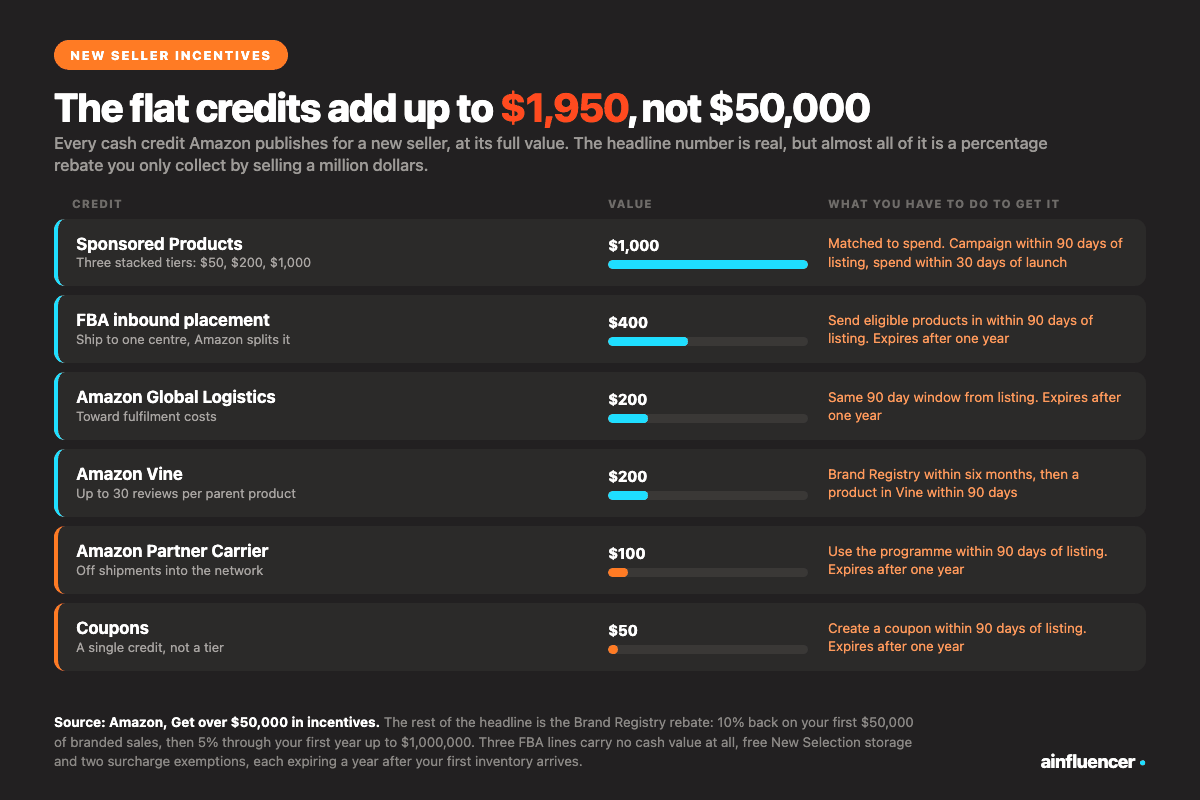
The incentives are the reason to read the page rather than a summary of it. Amazon headlines over $50,000 in new-seller incentives, and the components it lists include:
- 10% back on your first $50,000 in branded sales, then 5% back through your first year until you reach $1,000,000
- A $200 credit for Amazon Vine
- A $200 credit toward fulfilment costs when you use Amazon Global Logistics
- Free storage and customer returns through auto-enrolment in the FBA New Selection programme
- 25% off fulfilment costs on the first 100 units shipped with Multi-Channel Fulfillment
- Up to $1,000 in credit toward Sponsored Products ads
- A $400 credit for FBA inbound placement, which lets you send inventory to one fulfilment centre and have Amazon split and distribute it
- A $100 credit off shipments into the network through the Amazon Partner Carrier programme
- Exemption from the low-inventory-level charge and from storage utilisation surcharges, each expiring a year after your first FBA inventory is received
- A $50 credit toward Amazon Coupons
Note the shape of the branded-sales rebate, because it is widely misquoted as a flat 5% on the first $1,000,000. It is not. The first $50,000 earns 10% and the rest of the first year earns 5%, which front-loads the benefit into exactly the period this playbook covers and makes the order of your launch spending matter.
One honest caveat about the multiplier. Amazon does publish one, and the figure circulating in most articles is the wrong one. Its page states that sellers who use the New Seller Guide during their first 90 days generate approximately six times more first-year sales on average, not seven, and footnotes it to Amazon internal data for FY2023 in the US store. So the claim is real but it is Amazon’s own unpublished dataset, and a correlation between sellers who enrol in six programmes and sellers who do well would not tell you much either way. Take the credits, which are concrete and verifiable on Amazon’s own incentives page, and treat the multiplier as marketing.
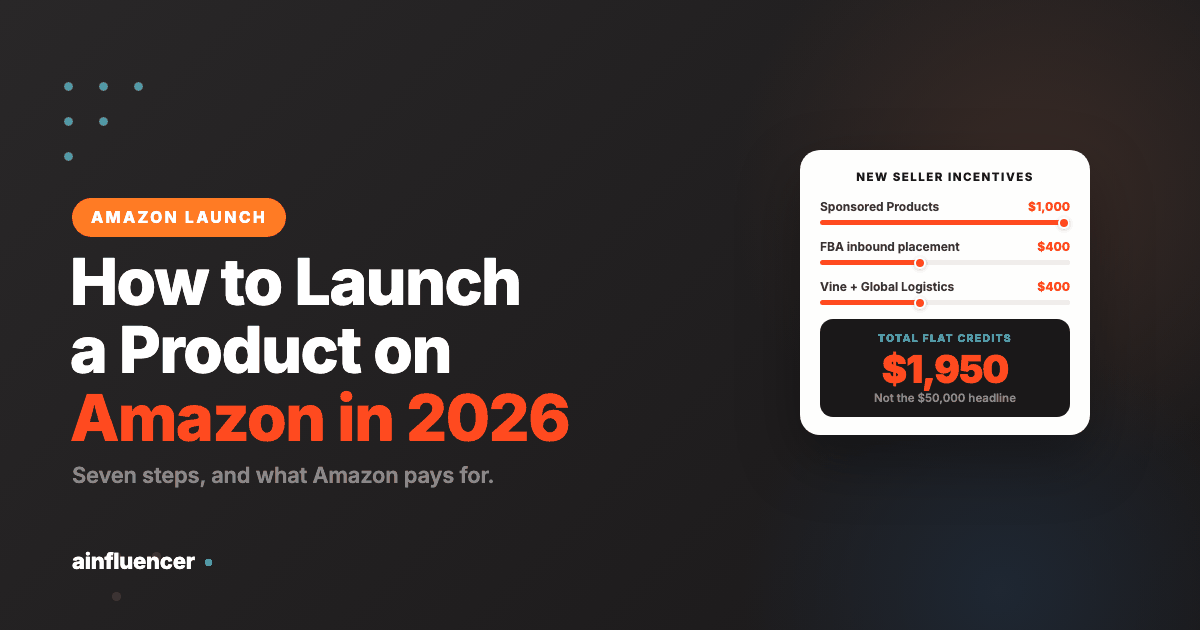
Worth adding the arithmetic nobody does. Add up every flat credit on that page and it comes to $1,950: $1,000 of Sponsored Products credit paid in three tiers matched to your spend, $400 for inbound placement, $200 for Global Logistics, $200 for Vine, $100 for the Partner Carrier programme and $50 for Coupons. Everything between $1,950 and the $50,000 headline is the branded-sales rebate, which means you only collect the advertised figure by selling a million dollars in your first year. That is not a reason to skip it. It is a reason to budget against $1,950 rather than against $50,000.
Terms change and the credits are the kind of thing Amazon revises quietly, so confirm current eligibility in Seller Central before you build a budget on any figure here.
Before You Decide How to Launch a Product on Amazon
Every playbook, this one included, starts at week minus four and assumes the product is worth launching. That assumption is doing an enormous amount of work, and it is where most of the money is lost. Four things decide whether the seven steps below will do anything for you, and all four are knowable before you spend a dollar.
- Whether you can get to Brand Registry first. Three of the six programmes Amazon offers new sellers are gated behind it, and so are A plus Content, Vine and Sponsored Brands. Launching without it is launching with the cheapest tools removed. If your trademark is still in application, the honest answer is usually to wait
- Whether the top of your category is winnable. Look at the first page for your priority keyword and read the review counts, not the ratings. A page one where the lowest listing has 4,000 reviews is not a launch problem, it is a different business plan. A page one where several listings sit under 300 is an opportunity
- Whether your price leaves room for the launch. Advertising cost during a launch is deliberately uneconomic: you are buying rank, not profit. If your margin after Amazon’s fees cannot absorb a period of ACoS well above target, you do not have a launch budget, you have a slow bleed
- Whether the product survives a bad first month. Launch traffic is concentrated, so early defects become early one-star reviews and those sit at the top of the listing for a long time. Anything you are unsure about in the packaging or the instructions should be fixed before the first unit ships, not after
Work through those four honestly and a meaningful number of products do not go. That is the playbook working, not failing. Knowing how to launch a product on Amazon includes knowing which products should not be launched yet, and nothing later in this guide recovers a product that failed all four tests at the start.
The Four Ways a Launch Stalls, and the Signal Each One Gives
A launch rarely collapses. It stalls, and the stall looks the same from the dashboard whatever caused it: sales flatten, rank slips, spend keeps going out. The four causes are distinguishable, though, and each gives a different signal in the first fortnight. Diagnosing the right one matters because the fixes are opposites.
- No impressions. Spend is low, impressions are low, and the campaigns look quiet rather than expensive. The listing is not eligible or not relevant for the terms you are bidding on. Fix the listing and the backend terms. Raising bids here burns money against the wrong queries
- Impressions but no clicks. You are being shown and ignored, which is almost always the main image, the price next to the competition, or the absence of reviews under the title. Raising bids makes this worse, because you pay to be ignored more often
- Clicks but no conversion. The traffic is right and the page is not closing. Bullets, A plus Content, the review count, or a price that is wrong for the tier you landed in. This is the only one of the four where pausing spend for a few days to rebuild the page is usually correct
- Conversion but no organic lift. The campaigns work and the rank will not hold when you reduce them. Sales velocity is too low for the category, or it is concentrated in terms too broad to rank for. Narrow to the five priority keywords and accept a slower, cheaper climb
Two weeks is the right window to make the call. Earlier than that the data is noise, and later than that you have spent the budget that would have funded the fix. If you take one operational habit from this section, make it the fortnightly review with these four buckets written at the top of it, because the pressure during a launch is always to raise bids, and in two of the four cases raising bids is the thing making it worse.
The wider point about how to launch a product on Amazon is that the seven steps are not a sequence you complete. They are a system you keep adjusting against these signals, and the sellers who do well are the ones reading the diagnosis rather than running the checklist.
Frequently Asked Questions
How long does an Amazon product launch take?
The core window is 30 days, the honeymoon period during which Amazon boosts your listing to test market fit. Full stabilisation to consistent organic ranking usually takes 60 to 90 days.
What is Amazon’s Perfect Launch, and does it still exist?
It exists, but Amazon has renamed it. The programme most articles still call Perfect Launch is now the New Seller Guide, and the phrase “Perfect Launch” no longer appears on Amazon’s own page for it. It covers your first 90 days in a new Amazon store. The “7x more first-year revenue” figure quoted around it is wrong: Amazon’s page says approximately 6x, footnoted to its own internal FY2023 US data.
How much should I budget for an Amazon product launch?
Budget $1,500 to $3,000: roughly $1,000 to $2,500 in PPC across 30 days, $200 for Amazon Vine, and $500 to $1,500 for creator partnerships. Then check what Amazon will cover, because new-seller credits can offset a large part of a first launch.
Do I need Brand Registry for a successful launch?
Technically no, but Brand Registry unlocks Vine, A+ Content, Sponsored Brands and storefronts, and Amazon treats enrolment as a prerequisite for the first three. Sellers without it face a materially harder launch.
What’s the biggest mistake in an Amazon product launch?
Under-budgeting PPC in the first 30 days. Sellers who economise on launch advertising watch competitors capture the keywords they should have owned, which costs months of organic ranking potential.
Can I launch without reviews?
You can, but PPC conversion drops sharply below five reviews. Plan to reach about 15 reviews within the first 21 days using Vine and the Request a Review button.
How do I know if my Amazon product launch is working?
Three signals: BSR falling steadily, organic sales appearing without PPC attribution, and PPC ACoS declining week over week. All three trending the right way by day 21 is a successful launch.
Should I run promotions during launch?
Coupons at 5 to 10 percent off can lift conversion without materially hurting margins. Avoid deep discounts of 30 percent or more, which train Amazon’s algorithm to expect artificial demand and can hurt long-term organic rank.