B2B Prospecting Tools: 12 Compared by the Kind of Data You Are Buying
A prospecting tool sells you data: company lists, emails, phone numbers or buying signals. Each kind costs differently and breaks differently. Here are twelve tools sorted by what they actually give you, priced from each vendor’s own page.
Lists of B2B prospecting tools put a database, an email finder, a social profile extension and an enrichment tool side by side as if they did the same thing. They do not. A prospecting tool answers a narrow question: who should we contact, and how do we reach them. Whether it gives you a list of companies, a verified email, a phone number or a signal that a company is buying decides what it costs and how it fails. This guide sorts twelve B2B prospecting tools, also sold as B2B prospecting software or a prospecting platform, by the kind of data they sell, shows what one contact costs in credits where the vendors print it, and prices each from the vendor’s own page. One disclosure: contactID and Ainfluencer, the first two cards, are our own products, and we say what each cannot do. Prices were read on each vendor’s own site on 9 and 10 November 2026.
What B2B Prospecting Tools Are
B2B prospecting is finding companies and people who could buy from you and getting their details. A B2B prospecting tool does part of that: it builds a list, finds or checks contact details, or tells you when a company looks ready to buy. It does not send the message or run the sales process, though many now bundle sending.
| Part of prospecting | What it answers | What can go wrong |
|---|---|---|
| Build a list | Which companies fit our buyer | A list that is too broad or out of date |
| Find a contact | Who at the company, and how to reach them | A wrong, missing or stale address |
| Verify the contact | Will this email or number work | Bounces that damage your sending reputation |
| Time it | Is the company in a buying moment | Signals that are guesses, not facts |
Six Kinds of Data a Prospecting Tool Can Sell
| Kind of data | What you get | Tools in this list | Best when |
|---|---|---|---|
| Company lists from maps | Businesses by category and city, with websites | contactID | You sell to local or small businesses |
| Creator profiles | Influencers with audience data | Ainfluencer | You are a brand prospecting creators |
| Contacts at companies | Names, emails and phone numbers filtered by role | Apollo, Amplemarket, Lemlist, Instantly, ZoomInfo | You sell to named roles at mid-sized companies |
| Email finding and checking | A verified address from a name and a domain | Hunter, Snov.io | You already know the people and need their addresses |
| Profile lookups | Details revealed from a professional profile | Lusha, LinkedIn Sales Navigator | Your buyers are findable on a professional network |
| Enrichment and research | Your own list filled in from many sources | Clay | You have a list and a specific question about each account |
Our guide to B2B sales tools sorts the whole stack by the question each tool answers. This one stays on the first step, finding who to contact.
The 12 B2B Prospecting Tools
Each card names the kind of data the tool sells. Where a page did not print a price, the card says so.
contactID
contactID is a Chrome extension and web dashboard from the Ainfluencer team. Its Find websites feature builds a list of businesses from Google Maps listings in 20 countries by category and city, and it then sends your message through the contact form on each company’s own website. It finds the form, fills it, handles cookie banners and CAPTCHAs, submits it and marks a site Sent only after a confirmation. It is ours, so weigh this card accordingly.
It gives you businesses and their websites, not named decision makers. That suits local and small-business buyers and does not suit a team that needs a VP of Finance at a 500-person company. Replies go to the email address you give your agent.
- Find websites: Google Maps listings in 20 countries by category and city
- Sends through each company’s own contact form, so prospecting and the first message are one step
- AI placeholders such as {Opener} write one line per website, optional and billed from a separate AI wallet
- A/B split testing and analytics showing the exact value typed into each field
- No email address needed to reach a business
- A credit is used only for a send the site confirms
- 10 free websites with no card, and failed sends are free
- Businesses and websites only, not named contacts by job title
- Runs in your own Chrome, Edge or Brave and stops when the browser closes
- Written solicitation rules can apply to targeted messages in some professions and countries
Ainfluencer
Ainfluencer is the influencer marketplace we run. It is a prospecting tool only in one sense: a brand looking for creators to promote its products. Its page says a brand can see full profiles with engagement stats, content samples and audience insights before reaching out, from a database it puts at more than 5 million creators. Username and email reveals are limited by a monthly quota that grows with the plan. It is ours, so weigh this card accordingly.
It is not a database of company contacts. Outreach happens inside its inbox, and a free Chrome extension, the AI DM Inviter, drafts a DM from a creator’s profile for Instagram and TikTok. We make no claim here about sales results.
- Creator profiles with engagement stats and audience insights before you invite
- A built-in inbox with bulk invitations, templates and in-app negotiation
- Username reveals and analytics reports, with a monthly quota by plan
- Escrow and automatic affiliate payouts in the same place
- A free plan to try it, with no card
- Search, conversation and payment in one place
- You can pay on commission, so cost follows results
- Creators only, not company contacts
- Invites are capped by plan: 2 a month on Free, 25 on Starter, 250 on Pro and unlimited only on Ultimate
- A fee on creator payments, from 35% on Free down to 3% on Ultimate
Apollo.io
Apollo is a B2B contact and company database that it puts at over 240 million contacts and 30 million accounts, with enrichment, sequences and a dialer. Credits are pooled across the team and expire each cycle, and the page labels its prices introductory.
Rules check: Apollo says it provides tools for GDPR, CAN-SPAM and do-not-call compliance and lists SOC 2 Type II and ISO 27001. Its data page says customers are responsible for lawful use of the data.
- 240M+ contacts and 30M+ accounts with filters and enrichment
- Sequences, a dialer and call recording
- AI research and scoring, with an MCP connection
- Salesforce and HubSpot integrations
- A free plan with no time limit
- Data and outreach in one login
- Easy per-seat forecasting
- Credits expire with no rollover
- Its 98% email accuracy claim has no stated method
- Organization is annual only with a three seat minimum
Clay
Clay does not own one database. It pulls data from many vendors into tables, runs AI research agents it calls Claygent, and fills your list with whatever you ask. That makes it a research layer for a list you already have.
Two usage meters, Actions and Data Credits, set the bill, and Claygent is priced by token usage.
- Tables that combine data from many vendors
- Claygent research on custom questions about each account
- Workflows that push results to a CRM or sender
- A free plan with 500 actions and 100 data credits a month
- Answers questions a standard database cannot
- A free plan to test
- A 14 day Pro trial is stated
- Two meters make the bill hard to forecast
- Its pricing page contradicts itself on rollover and on Launch data credits
- No compliance statement was readable
Amplemarket
Amplemarket combines a database it puts at 200M+ contacts with AI research and signals it calls Duo, multichannel sequences and deliverability tools. Only the Startup plan is priced on the page.
The free trial leads to a demo form, and its trial length is not stated.
- A 200M+ contact database updated weekly
- Duo AI agents for research and signals
- Email, LinkedIn, WhatsApp and SMS sequences
- SOC 2 Type II and GDPR and CCPA alignment stated
- Database, signals and sequences in one product
- Compliance statements are on the page
- Covers more channels than most sequencers
- No monthly price, only an annual term on Startup
- Trial length is not stated and goes through a demo form
- A 2024 footer sits on 2026 content
Hunter
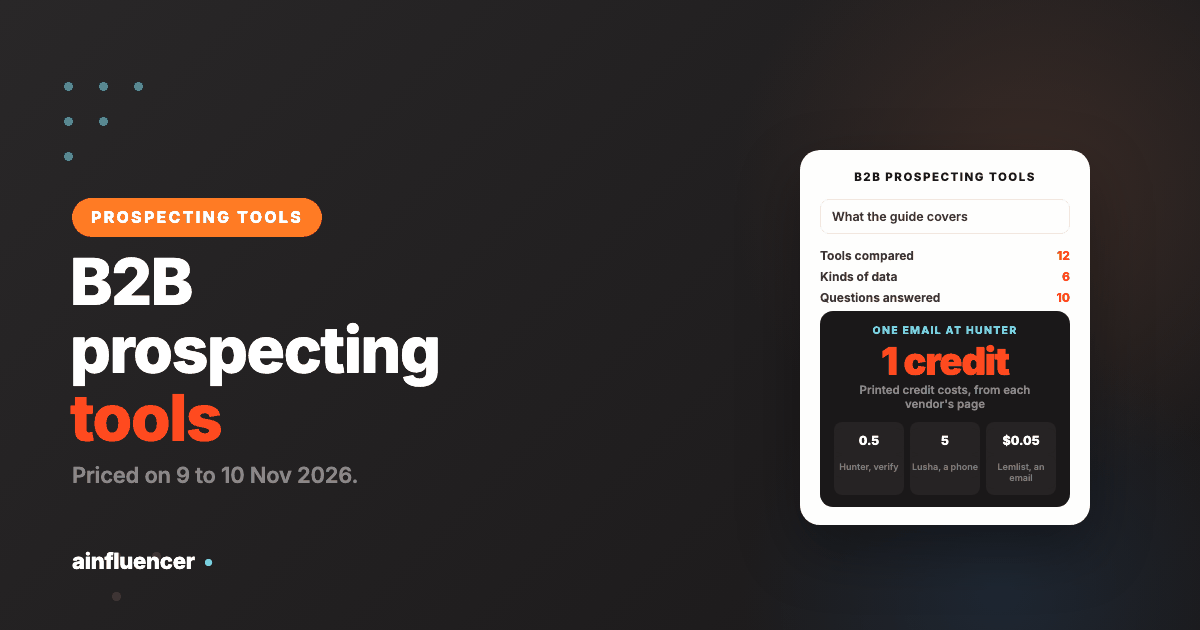
Hunter finds and verifies professional email addresses and sells an outreach tool beside it. Its pricing page states the cost of data in credits: an email found costs 1 credit and an email verified costs half a credit, and credits reset monthly and do not roll over.
The free plan gives 50 credits a month and the Starter plan 2,000, billed monthly or yearly.
- Email finder and verifier
- Domain search and B2B database filters
- Auto-verification and lead enrichment on Starter
- Sequences to send cold emails
- Credit costs are printed plainly
- A free plan for 50 credits a month
- Yearly billing is cheaper
- Credits do not roll over
- It finds emails but not phone numbers on the pages we read
- The free plan is small
Lusha
Lusha reveals contact details for people you find, through a browser extension and a workspace. Its pricing page states credit costs: a verified email costs 1 credit and a phone number costs 5, and the free plan gives up to 40 credits a month.
Its page shows a rating of 4.3 out of 5, which is the vendor’s own figure. Paid plan prices are not in the page text we read.
- A browser extension and a workspace
- Intent and buying signals, and lead prioritization
- CRM sync and an API
- Credit-based pricing with a stated cost per email and phone
- Credit costs per email and per phone are printed
- A free plan for 40 credits a month
- Cancel any time, with credits kept to the end of the period
- Paid prices are not printed in the page text we read
- A phone number costs five times an email
- The free allowance is small
Snov.io
Snov.io combines an email finder and verifier with database search and outreach campaigns. Credits can be split between finding and verifying emails, and unlimited prospect storage is listed on every plan.
LinkedIn account slots are not included in the price. They are bought separately at $69 a month per slot, according to its page.
- An email finder and verifier with shared credits
- Database search by company and role
- Unlimited prospect storage
- Annual billing with a 25% discount
- Finding and sending in one tool
- A free trial
- A published five-tier price ladder
- LinkedIn slots cost extra, $69 a month each
- Credits are shared between finder and verifier, so you must plan the split
- The Ultra tier is $738 a month
LinkedIn Sales Navigator
Sales Navigator is LinkedIn’s own search and lead tool. It is manual: you search and save leads, and it does not send messages for you. Its page says the Core plan starts at US$119.99 a month per license or US$1,079.88 a year per license, a 25% saving with annual billing.
Many automation tools use Sales Navigator searches as their source, which is why we cover the rules in our LinkedIn automation tools guide.
- Advanced search of people and companies on the network
- Saved leads and alerts
- A published price per license
- No automation, so no extra account risk from the tool itself
- Comes from the platform your buyers use
- The price is printed
- No bots or proxies involved
- It does not give you emails or phone numbers on the pages we read
- It is priced per license, so a team multiplies the cost
- It reaches only people with a profile
Lemlist
Lemlist adds a lead database and an email and phone finder to its outreach tool. Its page gives two figures for the database, 650M+ and 600M+, and sells data as credits: its own example is that 2,000 credits buys 400 emails or 100 phone numbers.
We price all three of its meters in our Lemlist alternatives guide.
- A lead database and an email and phone finder
- Enrichment credits, with rollover while you stay subscribed
- Buying intent signals as a separate pack
- Email, LinkedIn, calls, WhatsApp and SMS outreach
- Data and sending in one login
- Credits are charged only for successful results
- Credit rollover while subscribed
- Enrichment is an add-on on top of the plan
- Its page gives two database sizes
- A phone number costs four times an email in its own example
Instantly
Instantly sells a lead database of 450M+ records with filters, in credits that are separate from its sending plans, beside unlimited mailboxes and warm-up for sending.
We read its credits and limits in our Instantly alternatives guide.
- A 450M+ record lead database with filters
- Lead credits sold as a separate plan
- Unlimited email accounts and warm-up
- Follow-up sequences and a reply agent
- Database and sending in one login
- Sending price follows contacts and emails, not seats
- No add-on menu for mailboxes
- Lead credits are a separate plan from sending
- Email only
- Growth lists only 1,000 contacts and 5,000 emails
ZoomInfo
ZoomInfo is the large-company option and the tool most rival lists put first. Its pricing page offers a free trial and a way to get pricing, and prints no price.
Its own blog ranks itself first among prospect research tools, which is the vendor’s view. Plan on a sales call before you can compare it.
- Contacts and companies with enrichment
- Buying intent and signals
- CRM and workflow integrations
- A free trial listed on its pricing page
- Built for large teams and large databases
- A free trial exists
- Often the benchmark other tools are compared to
- No printed price at all
- Quote-based pricing makes it hard to compare
- More than a small team needs, which is our view
What One Contact Costs in Credits
Prospecting data is usually sold in credits. The vendors that print what a credit buys let you work out a cost per contact. This is our arithmetic from the printed figures and assumes you spend every credit on that one type of data.
| Tool | Credits for an email | Credits for a phone | Free allowance | Cost of an email at the first paid plan |
|---|---|---|---|---|
| Hunter | 1 found, 0.5 verified | Not listed | 50 credits a month | EUR 0.0245 (EUR 49 for 2,000 credits, monthly billing) |
| Lusha | 1 | 5 | 40 credits a month | Paid price not printed |
| Lemlist data | 5 (its example) | 20 (its example) | 200 trial credits | $0.05 ($20 for 2,000 credits, monthly billing) |
| contactID | Not applicable | Not applicable | 10 free websites | $0.15 per confirmed website, pay as you go |
The costs are small per contact, and they are not the whole cost. A cheap email that bounces damages your sending reputation, so verify before you send. The cheapest credit is one you spend on a verified address. If you are weighing a contact database against these credit tools, our guide to RocketReach alternatives turns RocketReach’s annual export caps into a cost per export.
How to Choose
Name the kind of data you need
Use the table near the top. A list of local businesses, a verified email and a buying signal are three different products.
Test on companies you already know
Run the tool on fifty companies where you know the right contact. Count how many it gets right before you buy at volume.
Price a contact, not a plan
Work out the credits one usable contact costs, including verification, and multiply by the list you really need.
Check the credit rules
Do credits roll over, reset monthly or expire? A plan that wastes half its credits costs twice as much.
Check where the data goes next
It should write to your CRM or sender, or you will copy it by hand.
Where B2B Prospecting Goes Wrong
Trusting accuracy claims
Every vendor’s accuracy figure is its own. Test a sample before you scale.
Burning credits early
Free and small plans run out before the month ends. Budget credits per list, not per month.
Skipping verification
Sending to unverified emails raises bounces and harms your domain. Verify first.
A list too broad to write to
A list of everyone gets a message about no one. Narrow it before you buy data for it.
Stale data
People change jobs and companies close. Refresh before every campaign.
Ignoring the rules
Third-party data and cold email both carry duties that stay with you, whatever the vendor says.
For the strategy around prospecting, including what selling and marketing costs at public software companies, see our guide to B2B SaaS lead generation, and for what comes after the list, our AI sales tools guide.
Conclusion: Which Prospecting Tool Should You Start With?
If you sell to local businesses
Build the list and send the first message with contactID, and test it on 10 companies for free.
If you know the roles you want
Start with Apollo’s free plan or Hunter’s, test on fifty companies you know, and verify before you send.
If you are a brand looking for creators
Search creator profiles in Ainfluencer before you invite them.
Frequently Asked Questions
What are B2B prospecting tools?
They are software that helps you find companies and people who could buy from you and get their contact details. Some build lists, some find or verify emails and phone numbers, and some signal when a company looks ready to buy.
What is the best B2B prospecting tool?
It depends on the kind of data you need. Apollo and Amplemarket suit contacts at companies, Hunter and Snov.io suit emails, Lusha suits phone numbers, Clay suits enriching your own list, contactID suits local business lists, and Sales Navigator suits manual search on LinkedIn.
What is B2B prospecting software?
The term is used interchangeably with B2B prospecting tools. It often means a product that also bundles sending, such as a database with sequences.
What is a B2B prospecting database?
It is a store of company and contact records you can search and filter, such as Apollo, which puts its size at over 240 million contacts, or Instantly’s lead database of 450M+ records. Each size is the vendor’s own figure.
Are there free B2B prospecting tools?
Yes. Apollo has a free plan with no time limit, Hunter’s free plan gives 50 credits a month, Lusha’s gives 40, Clay’s gives 500 actions and 100 data credits, Ainfluencer has a Free plan limited to 2 invites a month, and contactID gives 10 free websites.
How much do B2B prospecting tools cost?
From free to $119.99 a month per license for LinkedIn Sales Navigator, with Apollo from $49 per seat a month on annual billing and Hunter from EUR 49. ZoomInfo and some others print no price.
How much does one email cost in credits?
At Hunter an email found costs 1 credit and verifying it costs half a credit. At Lusha a verified email costs 1 credit and a phone number 5. Lemlist’s own example is 400 emails or 100 phone numbers for 2,000 credits.
Do I need to verify emails from a prospecting tool?
Yes. A vendor’s accuracy claim is its own, and sending to wrong addresses raises bounces and can harm your sending reputation. Verify before you send.
Is it legal to use a B2B contact database?
It depends on the country. The CNIL says B2B prospecting can rest on legitimate interest with conditions and that you must make sure people were informed when data comes from third parties. The FTC says CAN-SPAM makes no exception for business-to-business email, and Canada’s anti-spam law carries penalties up to $10 million for businesses. This is not legal advice.
What is the difference between a prospecting tool and a CRM?
A prospecting tool finds who to contact. A CRM stores accounts, contacts and deals once you have them. Many tools do both in part, so check that the prospecting data can flow into the CRM you use.
Key Takeaways
- A B2B prospecting tool sells one of six kinds of data: company lists, creator profiles, contacts, emails, profile lookups or enrichment. Choose by the kind you need.
- Data is sold in credits. Hunter charges 1 credit for an email found and half for one verified, Lusha 1 for an email and 5 for a phone.
- Test any tool on fifty companies you already know before you buy at volume.
- Verify emails before you send, because bounces damage your sending reputation.
- A vendor’s compliance statement does not move your duty under CAN-SPAM, CASL or data protection law.
- contactID and Ainfluencer are ours: contactID builds business lists and sends through contact forms and does not give named decision makers, and Ainfluencer covers creators only.