YouTube BrandConnect: What It Is Now, and Who Can Use It
BrandConnect was renamed Creator Partnerships. The 25,000 subscriber bar is gone. Who qualifies now, where to find it, and its real limits.
If you went looking for BrandConnect in YouTube Studio and could not find it, nothing is wrong with your account. YouTube retired the BrandConnect name in 2026. The programme itself did not close. It was renamed and rebuilt as Creator Partnerships, and it now sits under the Earn section of YouTube Studio.
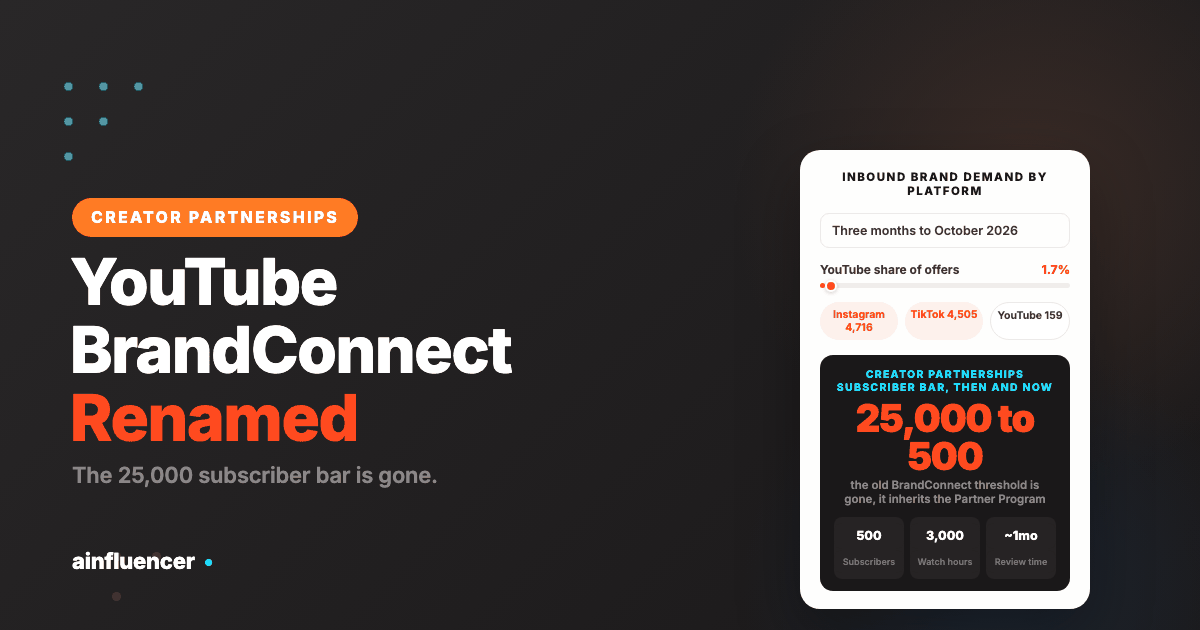
That rename matters more than it sounds, because the thing most people remember about BrandConnect is no longer true. It launched in 2020 as a United States only programme for channels with 25,000 subscribers or more. Today there is no separate subscriber bar at all. Eligibility comes from the YouTube Partner Program, which starts at 500 subscribers.
This page covers what changed, exactly who qualifies now, where to find the tab, and the honest limits of relying on it.
What Happened to BrandConnect
YouTube announced the change at NewFronts in March 2026. The company’s own framing is that no feature creators relied on was discontinued, only moved and renamed. Some coverage described it as a retirement. Both are fair: the name is gone, the function is not.
BrandConnect then, Creator Partnerships now
| BrandConnect, from 2020 | Creator Partnerships, from 2026 | |
|---|---|---|
| Name in Studio | BrandConnect | Creator Partnerships, under the Earn section |
| Subscriber bar | 25,000 subscribers | None of its own. It inherits the Partner Program threshold, which is 500 |
| Countries | United States only at launch | A limited set of markets at relaunch, expanding |
| How brands are matched | Manual curation and a campaign marketplace | An AI assisted matching layer, with campaigns surfaced to eligible channels |
| Who it is for | Mid-sized and large channels | Any channel already in the Partner Program, in an available market |
The practical read: if you were turned away from BrandConnect years ago for being too small, that reason no longer exists. Check again.
Who Qualifies for Creator Partnerships
There are two layers, and almost everyone gets this wrong by looking only at the second one. Creator Partnerships has its own short list of conditions, and all of them assume you are already in the Partner Program.
The Creator Partnerships conditions
- You are 18 or over.
- Your channel is a YouTube Partner Program member.
- You are in a supported country or region.
- You have no active Community Guidelines strikes.
- Your channel follows YouTube’s monetization policies, which include the Terms of Service, Community Guidelines and Platform Policies.
The Partner Program thresholds underneath it
This is where the subscriber numbers actually live. There are two tiers, and the lower one is enough for Creator Partnerships.
The two Partner Program tiers, and which one you need
| Tier | Subscribers | Plus one of these | Also required | Unlocks |
|---|---|---|---|---|
| Entry tier | 500 | 3,000 qualified watch hours in 12 months, or 3 million qualified Shorts views in 90 days | 3 valid public uploads in the last 90 days | Fan funding, Shopping, and Creator Partnerships |
| Ad revenue tier | 1,000 | 4,000 qualified watch hours in 12 months, or 10 million qualified Shorts views in 90 days | The same upload activity | Everything above, plus a share of advertising revenue |
Two things worth knowing before you count the days. Hitting the numbers does not admit you automatically. Your channel goes to a human review that typically takes around a month, and it can take longer. And the announced change to Partner Program entry thresholds coming in 2027 does not change eligibility for Creator Partnerships, fan funding or Shopping, so the 500 subscriber route to this feature is stable.
We go through the thresholds, the review and the common rejection reasons in detail in YouTube monetization requirements, and the Shorts specific route in YouTube Shorts monetization.
How to Find It in YouTube Studio
- Open YouTube Studio on desktop.
- In the left menu, go to Earn.
- Select the Creator Partnerships tab.
- If you are eligible, the tab appears on its own. There is nothing to apply for separately.
If the tab is not there, it is one of three things, in order of likelihood: you are not yet in the Partner Program, your country is not in the supported list yet, or your channel has an active Community Guidelines strike. None of the three is fixed by waiting for the page to load differently.
What It Does, and What It Does Not Do
Creator Partnerships is a matching surface. Brands run campaigns through it, YouTube surfaces the ones your channel fits, and the deal, the briefing and the payment can run inside Google’s own systems rather than over email.
What that is genuinely good at:
- Legitimacy. The brand is verified and the payment path is Google’s. For a first brand deal, that removes the two things most likely to go wrong.
- Zero maintenance. Once the tab is on, it costs you nothing to leave running in the background.
- Your own data does the selling. Matching uses the analytics YouTube already holds, so there is no media kit to assemble first.
What it is not:
- It is not a pipeline. Campaigns appear when a brand happens to run one that fits you. You cannot make that happen more often.
- It is not a negotiation. Campaign terms largely arrive fixed. The leverage you have in a direct deal is mostly absent.
- It is not available to everyone. Country coverage is still limited, and a creator outside those markets has no route in at all, however big the channel.
Why You Should Not Build Your Plan Around It
This is the part most guides to this topic leave out, and it is the most useful thing on the page.
Inbound brand demand on YouTube is thin compared with the short-form platforms. On our own marketplace, in the three months to October 2026, brand offers to creator accounts split like this:
Brand offers sent to creator accounts, three months to October 2026
| Platform | Offers received | Share |
|---|---|---|
| 4,716 | 50.3% | |
| TikTok | 4,505 | 48.0% |
| YouTube | 159 | 1.7% |
YouTube took 1.7% of the inbound offers. The caveat matters and we will state it plainly: this measures demand on one marketplace, not the industry, and most YouTube sponsorship happens direct or through agencies where nobody counts it. But the direction is consistent with what creators report, and it says something simple about every YouTube brand hub, Creator Partnerships included: it is a channel of demand, not a plan.
Switch it on. Then go and earn deals somewhere you control the rate at which they arrive.
What to Check Before You Accept a Campaign
A campaign arriving through YouTube’s own hub feels safer than a cold email, and in the ways that matter most it is: the brand is verified and the payment path is Google’s. That safety covers whether you get paid. It does not cover whether the deal is good for you, and those are different questions.
Read every campaign against these five before you accept, because once you have accepted, the terms are the terms.
Five things to read in a campaign brief
| What to look for | Why it matters | What should make you pause |
|---|---|---|
| The deliverable | A 30 second mention and a dedicated video are completely different amounts of work for completely different fees | A brief that says “a video” without saying which. Ask before you accept |
| Exclusivity | A category block stops you taking any competitor deal for its duration | Anything beyond about 30 days on a single mention. That is a year of lost deals for one fee |
| Usage rights | Whether the brand can run your footage as a paid advert, and for how long | Perpetual or unlimited usage bundled in at no extra cost. It is a separate product and worth more than the video |
| Approval and edits | How many revision rounds, and whether they can change what you say | Unlimited revisions, or approval over your opinion rather than the facts |
| The fee against your own maths | Your rate should be projected views divided by 1,000 times a rate per thousand, not whatever is offered | A flat fee that works out well below your usual rate per thousand views |
If the fee is low but everything else is clean, it can still be worth taking early. A completed campaign with a recognisable brand is a credential you use in every pitch afterwards. Take it with your eyes open, not because the interface made it feel automatic. We set out the pricing arithmetic in how to get sponsored on YouTube.
How to Make Your Channel Easier to Match
Matching runs on the data YouTube already holds about your channel. You cannot make brands run more campaigns, but you can make your channel legible to the ones that exist. Four things do most of the work.
- Be about one thing, visibly. A channel whose last ten videos sit in one subject is easy to place against a brand. A channel that moves between unrelated topics is hard to place against any of them, however well each video performs.
- Keep uploading. Three valid public uploads in the last 90 days is the Partner Program’s own activity requirement, and a dormant channel is not a candidate for a campaign with a launch date.
- Know where your audience is, and say so. Geography disqualifies more creators than size does. A brand that ships to two countries cannot use an audience spread across forty, whatever the view count.
- Protect the strikes record. An active Community Guidelines strike removes eligibility outright, and it is the one condition on the list that is entirely within your control.
None of this is gaming anything. It is the same work that makes a channel easier for a human brand manager to say yes to, which is the point.
Where Creator Partnerships Sits Among Your Options
Three ways to get brand deals, compared on what you control
| Creator Partnerships | A creator marketplace | Direct outreach | |
|---|---|---|---|
| Who starts it | The brand | Either side | You |
| Can you increase the volume | No | Yes, by applying to more campaigns | Yes, linearly with effort |
| Entry requirement | Partner Program plus a supported country | Usually none | None |
| Room to negotiate | Limited | Moderate | Full |
| Time to a first deal | Unpredictable | Days to weeks | Weeks to months |
| Best used as | Background income you did not chase | Your first paid deal, and a steady base | The place the real fees are |
The three are not alternatives. Run all three, and understand that only the last two respond to effort.
What to Do If You Are Not Eligible Yet
Nothing about getting paid by a brand requires YouTube’s permission. Brand deals are a private arrangement between you and the company, so a channel outside the Partner Program can still be sponsored. Only YouTube’s own hub is gated.
- Work on the entry tier, not the ad tier. 500 subscribers and 3,000 watch hours is a much nearer target than 1,000 and 4,000, and it is the one that opens this feature.
- List your channel on a creator marketplace. You can apply to campaigns immediately, with no threshold, which is the quickest route to a first paid deal on your record.
- Email the brands you already use. Name the video you would make and when it goes out. We cover how to structure that in how to get sponsored on YouTube.
- Keep three public uploads inside every 90 days. This is the requirement that quietly disqualifies dormant channels that otherwise meet the numbers.
There Is No Opt In, and What Happens When You Tap Interested
People go looking for a sign-up button and conclude they were rejected when they cannot find one. There isn’t one. If your channel meets the conditions, the tab surfaces automatically in the Earn tab of YouTube Studio, on desktop and in the app. Nothing to apply for, and no queue to wait in.
The step that actually matters is the one nobody warns you about. When a brand sends an inquiry and you choose Interested, YouTube shares your contact details with that brand. That is the moment your email address leaves YouTube, and it does not come back. Treat Interested as handing over your contact information, not as asking a question, because a brand you never work with keeps your address either way.
Two other things are worth knowing before you use it:
- Sharing channel insights improves your visibility in creator search. It is optional, and leaving it off makes you harder to find
- You can leave entirely. Opting out is done by email rather than by a toggle, and YouTube publishes two separate addresses, both at google.com. The mailbox youtube-creator-partnerships-opt-out removes you from the programme altogether. The mailbox youtube-brandconnect-opt-out is the narrower one, for opting out of search recommendations and brand outreach while staying in the programme
If YouTube BrandConnect Is Not Available Where You Live
Creator Partnerships runs in 24 countries and regions. If you are not in one of them, this is the part worth being blunt about: no amount of growth changes it. A creator in an unlisted country with two million subscribers and a clean record still does not get the tab, because the gate is geography, not performance.
That is not a small group. It is also why reading YouTube BrandConnect as the route into brand deals is a mistake for most of the world’s creators rather than a few unlucky ones. The marketplaces that are not tied to where you live do not have this problem, and neither does writing to brands directly.
If you are inside one of the 24 and still do not see the tab, work through the four conditions in order rather than guessing: 18 or over, in the Partner Program, based in an available country, and no active Community Guidelines strikes. The strike is the one people forget, because a strike expires quietly and nothing tells you the tab is being withheld because of it.
Is YouTube BrandConnect still available?
Yes, under a different name. YouTube retired the BrandConnect brand in 2026 and the programme continues as Creator Partnerships, inside the Earn section of YouTube Studio. The features creators used were moved rather than removed.
How many subscribers do you need for YouTube Creator Partnerships?
There is no subscriber requirement specific to Creator Partnerships. It requires YouTube Partner Program membership, and the Partner Program entry tier is 500 subscribers plus three valid public uploads in the last 90 days, and either 3,000 qualified watch hours in 12 months or 3 million qualified Shorts views in 90 days. The old BrandConnect bar of 25,000 subscribers no longer applies.
Where is Creator Partnerships in YouTube Studio?
Open YouTube Studio on desktop, go to Earn in the left menu, then select the Creator Partnerships tab. It appears automatically for eligible channels, so there is no separate application. If you cannot see it, the usual causes are that you are not in the Partner Program, your country is not supported yet, or your channel has an active Community Guidelines strike.
Do I need to be monetised to get brand deals on YouTube?
Not for brand deals in general. A sponsorship is a private arrangement between you and the brand, and nothing about it needs YouTube’s approval. You do need Partner Program membership to use YouTube’s own Creator Partnerships hub, and to earn a share of ad revenue.
Will the 2027 Partner Program changes affect Creator Partnerships?
No. YouTube’s own changelog states that the announced changes to Partner Program entry thresholds do not change the eligibility requirements for fan funding, Creator Partnerships or YouTube Shopping.
How long does approval take?
Once you meet the thresholds your channel goes into a review, which typically takes about a month and can take longer. Meeting the numbers does not guarantee acceptance, and channels are reviewed against YouTube’s monetization policies as a whole, not just the metrics.
Is Creator Partnerships enough to earn a living from brand deals?
For almost nobody. It surfaces campaigns when a brand happens to run one that fits your channel, and you cannot make that happen more often. For scale, it needs to sit alongside a creator marketplace you can apply through and direct outreach you control.
Do Not Wait to Be Matched
Creator Partnerships is worth switching on the day you qualify. It is not worth planning around. The creators who earn consistently from brand deals run a route they control alongside it.
You can list your channel on Ainfluencer free, with no subscriber threshold, apply to open campaigns rather than wait to be found, and negotiate directly with brands in the platform.
Related reading: how to get sponsored on YouTube, how much YouTubers make, how much YouTube pays per view, and how to become a YouTube influencer.