Influencer CRM: What to Track and 12 Options, From a Spreadsheet Up
An influencer CRM keeps every creator, conversation, deal and payment in one place. Here is what it should track, how much of one you actually need, and twelve options priced from each vendor’s own page.
An influencer CRM, also called influencer relationship management software or a creator CRM, is where a brand or agency keeps its creators: who they are, what was said, what was agreed, what was paid and what they posted. Most teams start in a spreadsheet and a crowded inbox and move when the history gets lost. The question is not which tool is best. It is how much CRM you need, because the options run from a free spreadsheet to platforms priced by quote. This guide lists what an influencer CRM should track, sorts twelve options by how much CRM they give you, and prices each from the vendor’s own page. One disclosure: the first option, Ainfluencer, is our own product, and we say what it cannot do. Prices were read on each vendor’s own site on 10 November 2026.
What an Influencer CRM Is
A regular CRM tracks buyers and deals. An influencer CRM tracks creators and collaborations, which adds fields a sales CRM does not have: audience size, platform, rates, deliverables, usage rights, content links and payment status. It is the memory of your creator program, so a new teammate can see who you worked with, what it cost and whether you would book them again.
| Spreadsheet | Generic CRM | Influencer CRM | Influencer platform | |
|---|---|---|---|---|
| Tracks | Whatever columns you add | Contacts and deals | Creators, stages, rates and history | Creators plus discovery, payments and reporting |
| Copy and paste | Syncs your inbox | Matches threads to the creator | Built-in inbox or sync | |
| Cost | Free | Free to hundreds a month | Free to a few hundred a month | Hundreds to thousands a month |
| Breaks when | More than a few dozen creators or two people | You need creator fields it lacks | You also need discovery and payments | You only needed a roster |
What an Influencer CRM Should Track
Whatever tool you choose, these are the fields that make the record useful. If a tool cannot hold most of them, it is not an influencer CRM.
| Group | Fields | Why it matters |
|---|---|---|
| Who they are | Name, handle on each platform, niche, follower count, country, contact email | You can find and filter them later |
| Where it stands | Stage (contacted, replied, negotiating, signed, posted, paid), owner on your team, last contact date | Nothing goes cold unseen |
| What was agreed | Deliverables, rate, usage rights, exclusivity, deadline, contract link | You can prove what was promised |
| What they delivered | Content links, post date, performance, approval status | You judge them on results |
| What you paid | Amount, date, invoice or payout status | Finance and rebooking decisions |
| Notes | Tone, preferences, past issues, would you rebook | The part a new teammate cannot guess |
How Much CRM Do You Need?
| If you | You need | Options in this list |
|---|---|---|
| Work with fewer than about 30 creators, alone | A spreadsheet or a free database | A spreadsheet, Notion |
| Already use a sales CRM and have a small team | A generic CRM with custom fields | HubSpot, Attio |
| Work with dozens of creators across a team | A creator CRM with stages, email sync and bulk actions | HypeAuditor My Network, Modash, Influencer Hero, CreatorPilot |
| Also need discovery, gifting and payments | A full influencer platform | GRIN, Aspire, Upfluence, Ainfluencer |
The thresholds are our judgment, not a measured figure. The honest rule is to move up only when the lower option costs you creators or time. Our guide to the wider field of influencer marketing platforms covers the top tier in more depth.
The 12 Influencer CRM Options
Each card says how much CRM the product gives you and where it stops. Where a page did not print a price, the card says so.
Ainfluencer
Ainfluencer is the influencer marketplace we run, and it works as a CRM for the part of your program that runs through it. According to its page, every message, offer and negotiation sits in one campaign-linked inbox, with customizable templates, bulk messages and in-app negotiation and offer management, so the history is tied to the creator and the campaign. It is ours, so weigh this card accordingly.
It is not a general contact database. It tracks creators you work with inside the platform, and you cannot contact creators outside it. For Instagram and TikTok a free Chrome extension, the AI DM Inviter, drafts a DM from a creator’s profile for you to send. We make no claim here about sales results.
- A campaign-linked inbox for every message, offer and negotiation
- Bulk messages and templates, with media attachments
- Offers, escrow and payouts in the same place as the conversation
- Analytics reports and username reveals, with a monthly quota by plan
- The conversation, the deal and the payment sit together
- A free plan to try it, with no card
- Nothing to import for creators you meet inside it
- It tracks creators inside the platform only, and cannot hold your outside contacts
- Invites are capped by plan: 2 a month on Free, 25 on Starter, 250 on Pro and unlimited only on Ultimate
- A fee on creator payments, from 35% on Free down to 3% on Ultimate
HypeAuditor My Network
My Network is the influencer CRM inside HypeAuditor. Its page describes a roster in one table with 55+ fields and columns, custom relationship stages, unlimited lists and a way to import an existing list in one upload. You can connect your email account and it matches each thread to the right creator.
A built-in AI agent called Campaign Fit Score scores every creator on your list against a campaign or brief. We cover the company in our HypeAuditor review, and its pricing page printed no price we could read.
- 55+ fields and columns, custom stages and unlimited lists
- Email threads matched to the right creator automatically
- Bulk status changes, tagging and messaging
- Campaign Fit Score, an AI agent that ranks your creators
- Built for the CRM job, not a side feature
- Import from a spreadsheet or another platform
- Lists can be private to a teammate
- No readable price on the pages we found
- It sits inside a larger HypeAuditor account
- Some limits vary by plan, according to its own comparison
Modash
Modash lists an influencer CRM in every plan: import creators by CSV, handle or email, set statuses and labels, and store documents, notes, address, birthday and rates. It adds custom columns, bulk actions, shared team inboxes and a Gmail or Outlook inbox sync.
It is a search engine first, which is why the plans meter opened profiles and unlocked emails. We read its limits in our Modash review.
- Import by CSV, social handles or emails
- Statuses, labels, notes, documents, rates and custom columns
- Gmail or Outlook inbox sync and shared team inboxes
- 380M+ creator profiles for discovery
- CRM and discovery in one login
- Custom columns and bulk actions in every plan
- Shared inbox for the team
- Plans meter opened profiles and unlocked emails
- Entry price is $199 a month
- You pay for discovery even if you only wanted the CRM
Influencer Hero
Influencer Hero’s pricing page says every plan includes the full influencer CRM, outreach automation and UGC tracking, with the quota rising by plan. Standard lists 1,000 reach-outs a month with 1 seat, Pro 5,000 with 3 seats, and Business 10,000.
Its plans also list product seeding, influencer analytics and automated payouts.
- A CRM on every plan, with outreach automation
- Product seeding and automated payouts
- UGC tracking and influencer analytics
- Training and consultation on Standard
- The CRM is not held back for higher plans
- Yearly billing is cheaper
- Quotas are stated
- The cheapest plan is $649 a month on a 3-month commitment
- Seats are limited to 1 on Standard and 3 on Pro
- Pro and Business need a demo
GRIN
GRIN’s pricing page lists unlimited CRM contacts and a creator marketplace on every plan, including Free, with an AI agent called Gia that finds creators, drafts and sends outreach and reports on results. It says there is no per-contact billing.
Plans meter creator searches and gifts, and add a management fee on the money you deposit to pay creators. We cover it in our GRIN review.
- Unlimited CRM contacts on every plan
- A creator marketplace where creators apply
- Gia, an AI agent that drafts and sends outreach
- An escrow wallet and payouts
- No per-contact billing
- A free plan with 2 live campaigns
- CRM, outreach and payments together
- A management fee of 5% to 20% on wallet deposits, by plan
- More platform than a team that only wants a roster needs
- Its page lists 700K+ creators, fewer than the biggest databases
Aspire
Aspire’s homepage lists a Contact Hub described as every creator and every collaboration in one view, plus a marketplace, AI creator discovery in plain language, a campaign manager and automated workflows. Its glossary page on influencer relationship management argues that a creator on a fourth post with a brand typically produces better content.
We could not read a pricing page: its pricing URL returned a 404. We cover it in our AspireIQ review.
- A Contact Hub with a single view per creator
- A marketplace and AI creator discovery
- Campaign management and content approval
- Automated workflows and personalized incentives
- CRM, discovery and campaigns in one platform
- Workflows for approvals and reminders
- Trusted by 800+ brands according to its homepage
- No printed price, only a demo request
- We found no plan limits on the pages we read
- More suite than a team that only needs a roster
Upfluence
Upfluence prices by module and quotes each customer. Its pricing page describes a first module for searching and contacting creators, a second for launching campaigns and tracking sales, and a third for running programs on autopilot with budgets and payouts.
It does not print a price. We cover it in our Upfluence review.
- Search and contact creators on the major networks
- Drip sequences and mass outreach
- Sales tracking and payouts on higher modules
- A marketplace where creators apply
- Start with search and contact only
- Sequences are built in
- A free trial, set up after a call
- No public price
- Quoted pricing makes a quick switch harder
- Higher modules add budgets you may not need
CreatorPilot
CreatorPilot is a smaller tool whose own guide on influencer relationship management ranks in the results for this keyword. Its homepage lists influencer communication, standardized invoices, content approvals, collaboration dashboards and automated notifications, and says it is free to sign up, with a beta program offering 30 days of free access.
We did not find a printed paid price, and we could not tell how its limits work.
- Influencer communication and standardized invoices
- Draft content approvals
- Collaboration dashboards and automated notifications
- A beta program with 30 days free
- Free to sign up according to its page
- Focused on campaign management
- A guide that explains the CRM idea
- No printed paid price
- A small vendor, so check its track record
- We did not read its limits or integrations
HubSpot
HubSpot’s sales page lists a free CRM with an AI assistant, and paid tiers priced per seat. It is a general CRM, so you add your own creator fields and stages, and it syncs email.
It suits a team that already uses HubSpot for sales and wants one system.
- A free CRM with an AI assistant
- Custom properties for creator fields
- Email sync and sequences
- Reports on deals and activity
- A free starting point
- One system if you already use HubSpot
- Plans scale from one seat to a large team
- It has no creator-specific fields until you build them
- The Starter price shows $10 and $20 on the same page, so confirm it
- No discovery or payments for creators
Attio
Attio is a CRM whose free plan covers up to 3 seats, with real-time contact syncing and automatic data enrichment. Plus covers up to 10 seats with enhanced email sending, and Pro adds call intelligence, sequences, permission controls and advanced reporting.
Its flexible data model lets you build a creator list with your own fields. Prices are in euros per user a month.
- Real-time contact syncing and automatic data enrichment
- Custom lists and fields you design
- Enhanced email sending on Plus
- Sequences and advanced reporting on Pro
- A free plan for three seats
- Flexible enough for a creator roster
- A yearly option 20% cheaper
- No creator-specific features out of the box
- Plus is capped at 10 seats
- Prices are in euros
Notion
Notion is a workspace where a database can act as a creator roster, with a status column, a rate, links and notes, and a page per creator for the history. Its pricing page lists a free plan and paid plans per member a month.
It is the usual step above a spreadsheet, because it gives each creator a page and lets a team share it.
- A database with your own columns and views
- A page per creator for notes and history
- Shared access for a team
- Templates, including influencer CRM templates
- A free plan
- Flexible, with no vendor lock to a fixed process
- Cheap per member
- You build and maintain the structure yourself
- No email sync or payments for creators
- Not purpose-built, so no creator fields until you add them
A spreadsheet
A spreadsheet is where most programs begin, and for a handful of creators it is enough. One row per creator and the fields from the table above give you a working roster.
It stops working when a second person edits it, when the inbox becomes the real record, or when you cannot tell who was last contacted.
- One row per creator, with the tracked fields as columns
- Filters and sorting for stage and niche
- Sharing with a teammate
- A column for the next follow-up date
- Free
- No training and no lock-in
- Easy to export to any tool later
- Email history stays in the inbox, not the sheet
- No reminders unless you build them
- Versions drift when two people edit
What the Options Cost
| Option | Printed entry price | How it is billed |
|---|---|---|
| Spreadsheet | Free | Nothing to pay |
| Notion | Free, then EUR 9.50 per member a month | Per member |
| Attio | Free for 3 seats, then EUR 39 per user a month | Per user, monthly billing |
| HubSpot | Free, then from $10 per seat a month | Per seat |
| CreatorPilot | Free to sign up | Paid price not printed |
| Ainfluencer | Free, then $149 a month | By plan, plus a fee on creator payments |
| GRIN | Free, then $200 a month | By plan, plus a fee on wallet deposits |
| Modash | $199 a month | By plan, with usage meters |
| Influencer Hero | $649 a month | By plan, on a 3-month commitment |
| HypeAuditor My Network, Aspire, Upfluence | Not printed | By plan or by quote |
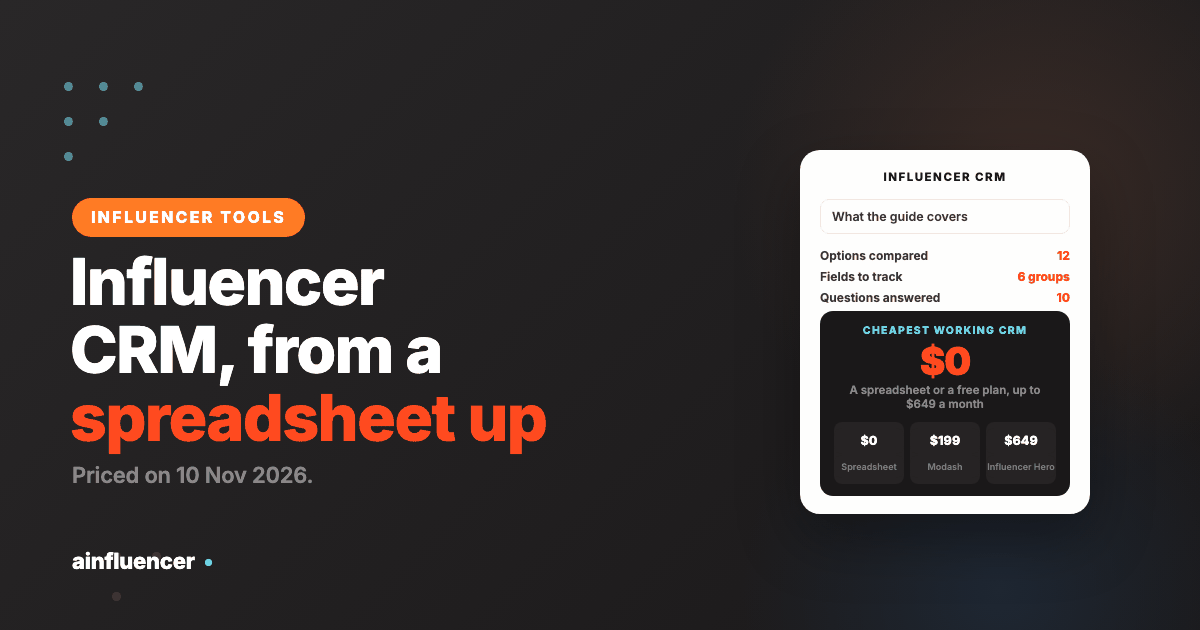
The cheapest working CRM is free, and the first paid step is about ten euros per member for a database tool. The creator-specific tools start around $150 to $200 a month and rise quickly with the platform around them. Price the tier you need, not the whole suite.
When to Move Up From a Spreadsheet
You lose a conversation
If you cannot find what you agreed with a creator without searching an inbox, the record has already failed.
A second person starts editing
Two people in one sheet drift apart quickly. A shared database or CRM keeps one version.
You rebook on instinct
If you cannot say how a past creator performed or what they cost, you need results and rates in the record.
Follow-ups slip
A CRM with stages and reminders stops creators going cold unseen.
You need payments and content in the same place
That is the point to look at a platform rather than a roster.
Where Influencer CRMs Go Wrong
Buying a platform for a roster
If you only need to track creators, a free database does the job. Pay for the platform only when you use its other parts.
Fields nobody fills in
A record with ten empty columns is worse than a short one. Track the fields in the table and make them required.
Two systems of record
If creators live in a spreadsheet and the inbox, neither is the truth. Pick one and move everything.
Our influencer outreach tools guide covers the sending side, and our influencer relationship management guide covers the practice a CRM supports.
Conclusion: Which Influencer CRM Should You Choose?
If you work with a few creators
Start with a spreadsheet or a Notion database and the fields from the table above.
If you manage dozens as a team
Look at HypeAuditor My Network, Modash or Influencer Hero, and test the email sync on your own threads.
If you also pay and gift creators
Try Ainfluencer or GRIN, and check the fee on creator payments.
Frequently Asked Questions
What is an influencer CRM?
It is software that keeps every creator, conversation, deal and payment in one place. It differs from a sales CRM because it tracks creator fields such as platform, audience, rates, deliverables and content links.
What is the best influencer CRM?
It depends on how much CRM you need. A spreadsheet or Notion suits a few creators, HubSpot and Attio suit teams that want a generic CRM, HypeAuditor My Network, Modash and Influencer Hero suit teams managing dozens, and Ainfluencer, GRIN and Aspire suit brands that also run payments and gifting.
What is influencer relationship management?
It is the practice of managing creators over time, not campaign by campaign, so you can rebook the ones that perform. An influencer CRM is the software that supports it.
What is the difference between an influencer CRM and an influencer marketing platform?
A CRM keeps the roster and the history. A platform adds discovery, gifting, payments and reporting around it. Many platforms include a CRM, so you rarely buy both.
Is there a free influencer CRM?
Yes. A spreadsheet or a Notion free plan works for a few creators, HubSpot has a free CRM, Attio’s free plan covers 3 seats, GRIN has a free plan with unlimited CRM contacts, Ainfluencer has a Free plan limited to 2 invites a month, and CreatorPilot says it is free to sign up.
What should an influencer CRM track?
Who the creator is, the stage, who owns the relationship, the last contact date, what was agreed, what they delivered, what you paid, and notes on whether you would rebook.
Can I use a normal CRM for influencers?
Yes, if you add your own creator fields and stages. HubSpot and Attio both let you do this. You lose creator-specific features such as discovery and payouts.
How much does an influencer CRM cost?
From free to about $649 a month on the options we priced. Modash starts at $199 a month, Influencer Hero at $649, GRIN at $200 after its free plan, and several tools do not print a price.
Do I need a CRM if I use an influencer platform?
Usually not. Modash, Influencer Hero and GRIN list a CRM in their plans, and Aspire calls its version a Contact Hub.
Is it legal to store creators’ contact details?
Privacy laws such as GDPR can apply depending on where the creators live, and we did not read them for this guide. Check where your creators are and keep only the data you need. This is not legal advice.
Key Takeaways
- An influencer CRM keeps creators, conversations, deals and payments in one record. Track who they are, the stage, what was agreed, what they delivered and what you paid.
- Decide how much CRM you need: a spreadsheet, a generic CRM, a creator CRM or a full platform.
- The cheapest working option is free, and the first paid step is about EUR 9.50 per member for a database tool.
- Move up from a spreadsheet when you lose a conversation, a second person edits, or follow-ups slip.
- Most platforms list a CRM in their plans, so you rarely buy both.
- Ainfluencer is ours: it tracks creators inside the platform only, caps invites by plan and takes a fee on creator payments.